
Communication
Weekly School Report
One email on Monday morning, to the school itself, covering the week just finished. Staff attendance, pupil attendance, the account statement, and fee collection with the arrears aged. Each reader is sent only the sections their own account is allowed to see.
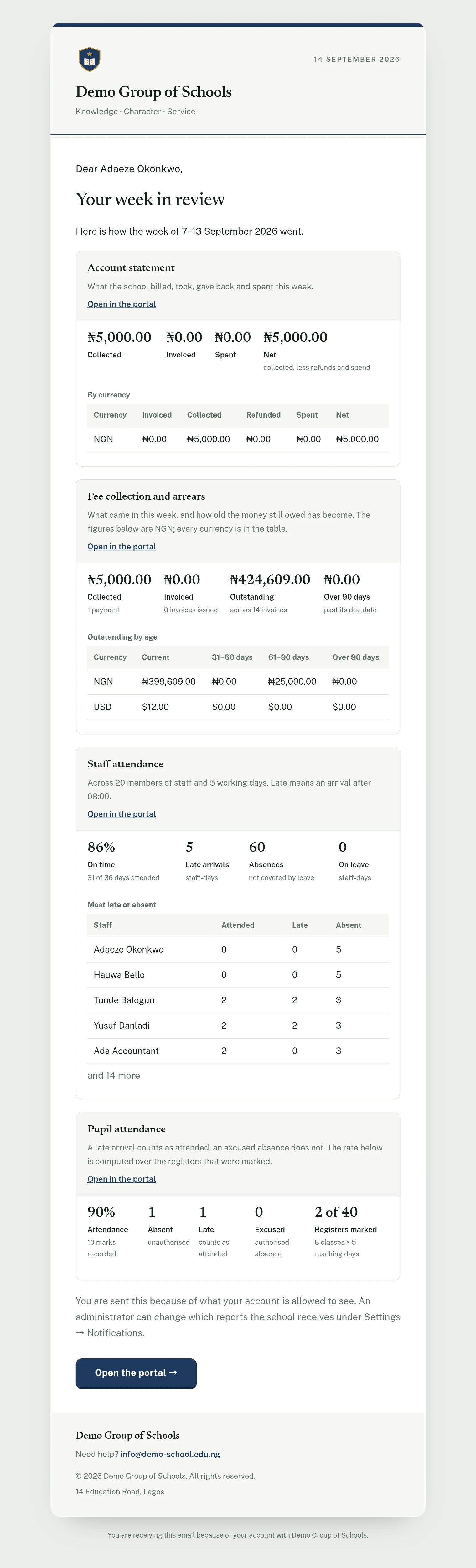
Everything else the platform sends goes outward: the weekly digest to parents, the fee reminder, the homework digest. This is the one message that comes inward, to the school itself.
It answers, in one email on a Monday morning, the four questions a head or a bursar would otherwise open four screens to ask: how were the staff, how were the pupils, what moved through the accounts, and who still owes.
What is in it
Four sections, each of which your school can switch off:
| Section | What it says |
|---|---|
| Staff attendance | The share of attended days that were on time, late arrivals, absences not covered by leave, and days on leave, with the staff who were most often late or absent named beside the days each of them attended. |
| Pupil attendance | The week's attendance rate, the absent, late and excused counts, how many registers were marked against how many were due, and the classes sitting below the school's own rate. |
| Account statement | Invoiced, collected, refunded, spent and net, per currency. The same figures the Cash Flow tab settles the month with, narrowed to the week. |
| Fee collection and arrears | What came in, what went out as invoices, and how old the money still owed has become: current, 31–60 days, 61–90 days, and over 90. |
The staff table lists each person's days attended, late and absent, and not a punctuality percentage. A percentage only counts the days someone came in, so a teacher absent four days who arrived on time on the fifth would read 100%. The number of days attended shows how much of the week the figure covers.
Each reader gets only what they are allowed to see
This is the part worth understanding, because it is not how most reports work.
The four sections are not four emails. They are one email, assembled for each reader out of the sections their own account already has permission to open. Your bursar's copy carries the money. Your head of year's copy carries the register and not the money. Neither of them can tell the other section exists.
That matters more in an email than anywhere else on the platform. A screen can hide a figure from somebody who may not see it. An email cannot: once a number is in the message body it has been delivered to whoever opens it, forwards it or reads it over a shoulder. So the sections a reader may not see are never written into their copy in the first place.
The keys are the ones you have already granted:
| Section | Needs |
|---|---|
| Staff attendance | View all staff attendance |
| Pupil attendance | View all attendance |
| Account statement | View finance |
| Fee collection and arrears | View finance |
Somebody who holds none of them is not written to at all, rather than being sent an empty report.
When it arrives
Monday morning at 7am, in your school's own time zone, covering the previous Monday to Sunday.
Friday evening was the other candidate and it lost. This is a report somebody has to act on: chase the arrears, ask a head of year about a class, find out why three registers went unmarked. None of that happens on a Friday night. Seven o'clock puts it at the top of the inbox before the first bell.
You can move the hour anywhere between 5am and 11am under Settings.
A quiet week sends nothing
If there is nothing to report, no email goes out.
That is deliberate, and it applies section by section. A school that does not run staff clock-in is not sent a staff attendance panel of zeroes every Monday; it gets the other three. A school in the middle of the holidays is sent nothing at all. A weekly report of four zeroes is worse than silence: it reads as an accusation, and it trains everybody to delete the message unopened.
The figures are the same figures
Nothing in this email is computed specially for it. Every number is the same read the screen beside it draws: the staff attendance tab, the attendance analytics, the cash flow statement and the finance report exports. A late arrival counts towards the attendance rate here exactly as it does everywhere else; a draft invoice counts as revenue here exactly as it does everywhere else, which is to say nowhere.
Every panel carries an Open in the portal link straight to the screen it was taken from, so the answer to "why is that number what it is" is one click away.
Turning it on and off
It is already on, for every section. Nothing needs setting up.
Under Settings → Notifications → Weekly School Report you will find a switch for the report as a whole, a switch for each of the four sections, and the send hour. Changing any of them needs the Manage notification preferences permission.
We ship it on rather than off on purpose. A school that has just registered has no reason to know this exists, and a report you have to go looking for is a report used only by the schools that already know what their week looked like.
On the phone
There is nothing to do on the mobile app for this report, which arrives by email and goes out on its own. Its settings can be changed from the phone, though: open More → Settings → Communication, where the Weekly School Report group has the switch for the whole report, one for each of the four sections, and the send hour. As on the web, changing them needs the permission to manage notification preferences.
Ready to try it with your school?
Three-month Basic trial. No card required to register.