
Finance
The Cash Flow Statement
What your school billed, took, gave back and spent, month by month, per currency, over any window you choose. Downloadable as a CSV to line up against a bank statement.
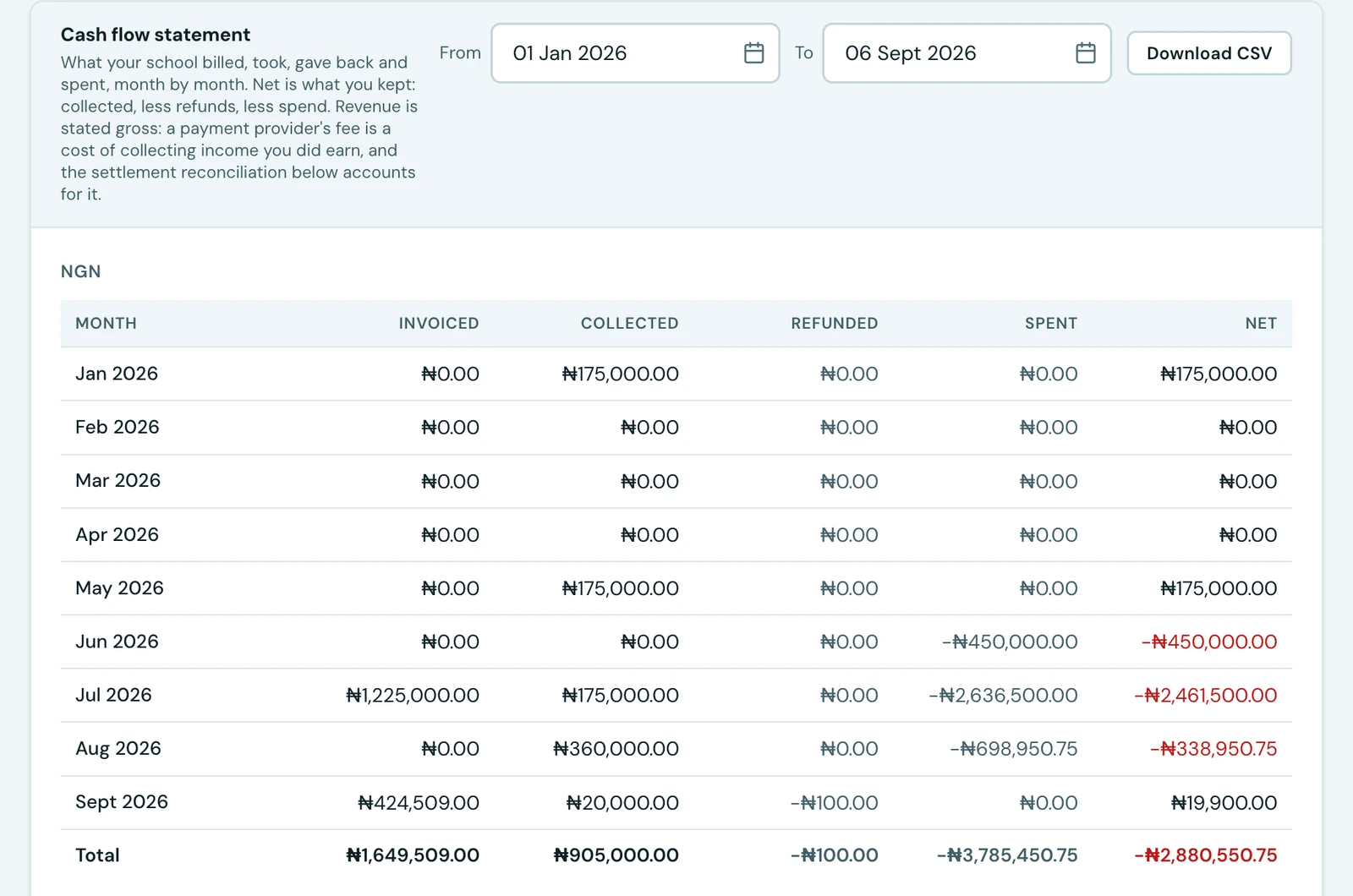
The Reports tab of the Finance Workspace opens with the plainest report there is, and the one an accountant asks for first: over these dates, what came in and what went out.
Pick a window with the From and To dates. It defaults to the year so far.
The columns
| Column | What it counts |
|---|---|
| Invoiced | Invoices raised that month, at the amount actually payable after any discount |
| Collected | Payments received that month, whatever the method |
| Refunded | Refunds sent that month |
| Spent | Expenses recorded that month: the rent, the diesel, the salary bill |
| Net | Collected, less refunded, less spent: what your school actually kept from that month |
Every month in the window is listed, including the quiet ones. A month with nothing in it shows zeros rather than being left out, so a statement is never shorter than the window it claims to cover.
Currencies are listed separately and never added together, the same rule the rest of the workspace follows. If you invoice in more than one, each gets its own table, largest first.
Three things worth knowing
Revenue is gross. An invoice for ₦50,000 paid in full is ₦50,000 collected, whatever the payment provider charged to move it. Their fee is a cost of collecting income you did earn, not a reduction in what you earned, and deducting it here would understate your takings and leave the invoice unable to read as fully paid. The settlement reconciliation directly below accounts for that gap.
Net counts what went out. This is the one report in the platform that reads both sets of books, and it is why the Net column can be negative: a month whose salary bill lands in it is very often a month a school spent more than it collected. A voided expense counts for nothing, exactly as a voided receipt does.
A refund counts in the month it was sent, not the month of the payment it reverses. A refund issued in March against a January payment reduces March. Reducing January instead would restate a month you had already reported and reconciled.
Corrections are excluded rather than netted. A cancelled invoice was never a charge the family owed, so it is not counted as billed. A voided receipt says the payment entry was a mistake and no money ever arrived, so it is not counted as collected. A voided refund likewise never left your account.
Downloading it
Download CSV gives you the same figures as a spreadsheet, one row per month with a labelled Total row per currency, built from exactly the window on screen. It needs the Export finance data permission; reading the statement needs only View finance.
On the phone
The cash flow statement is on the mobile app. Open Fees, tap the ⋮ menu at the top and choose Statements. Set the From and To dates (the year so far, to begin with), and Cash flow lists every month in the window, a block per currency, with totals for Invoiced, Collected, Refunded, Spent and Net, so the totals add up on the phone just as they do on the web. Each month shows its net, with what was billed, taken, given back and spent beneath it. The download button beside it saves the same CSV as the web if you hold the permission to export finance data.
Ready to try it with your school?
Three-month Basic trial. No card required to register.