
Academics
School Attendance Tracking
Mark roll calls per class daily, view weekly attendance trends, generate absence reports, and calculate per-student attendance rates.
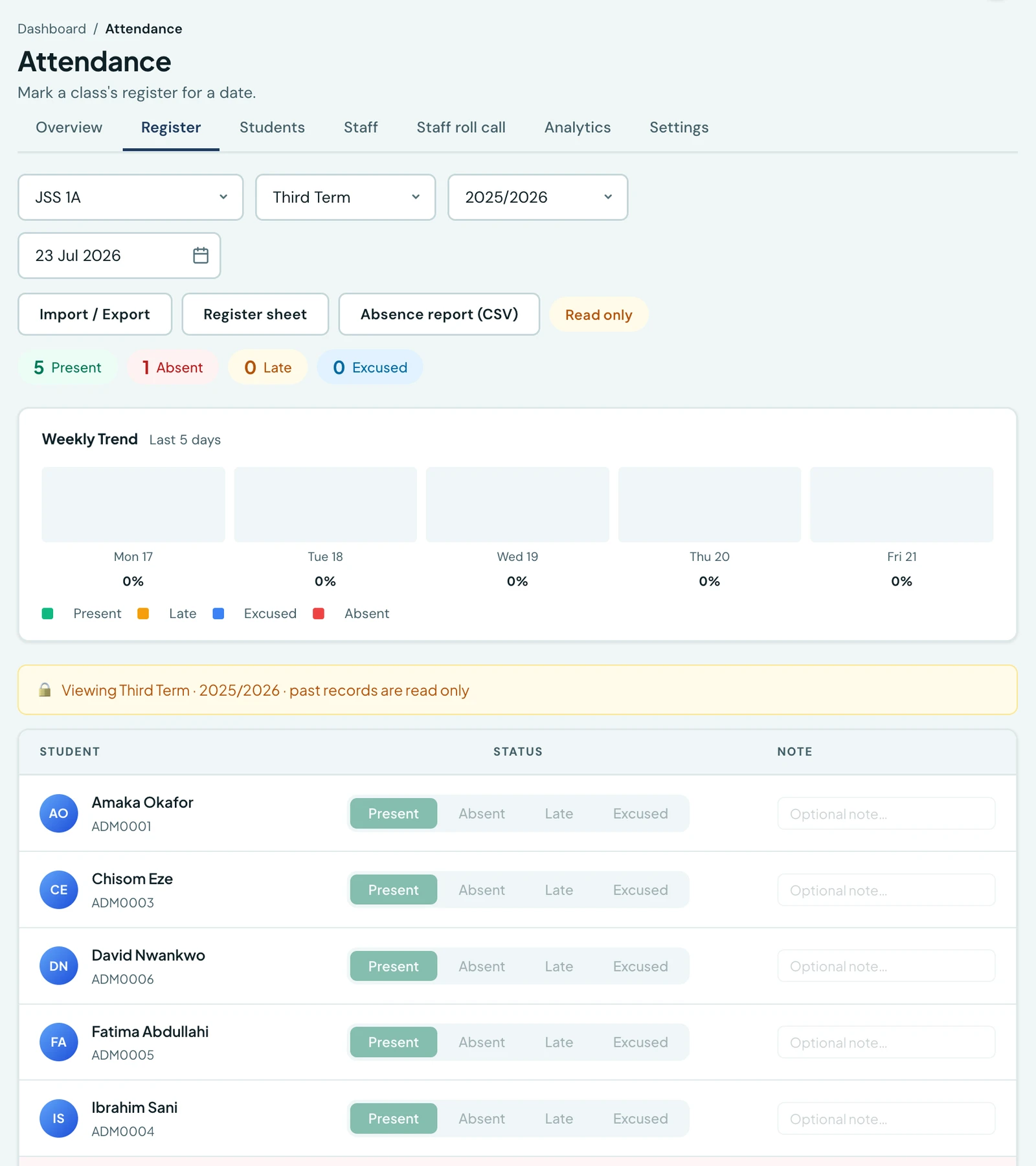
Mark daily roll calls per class, view weekly trends, and generate absence reports per term with zero manual tallying.
Everything to do with attendance lives on one page, under seven tabs. Overview is today: which classes have been marked and which are still owing one. Register is where a class is marked. Students is a pupil's own record. Staff is staff clock-in and leave, and Staff roll call shows who has been ticked in among the staff who have no phone to clock themselves in with, which is done in the mobile app at the gate. Analytics is the term's trends, and Settings holds the school's location, the times a working day runs to and which checks a clock-in must pass.
You do not need every permission to open the page. A class teacher who can take a register gets the Register and Students tabs, an office administrator who handles staff hours gets the Staff tab, and each tab checks for itself.
Marking attendance
Go to Attendance → Register. Select a class and date (defaults to today). For each student, mark: Present, Absent, Late, or Excused. Save the entire class at once.
Excused is for an absence the school has authorised: a medical appointment, a bereavement, a sanctioned trip. It is recorded and reported in its own right rather than being lumped in with an unexplained absence, and it prints on the report card as its own line.
The date has to fall inside the term
A register is filed against a term and a session, and the date has to be one that term actually covered. Marking a day in the August break, or any day outside the current term's dates, is refused and names the term and the dates in the way, so you can either change the date or amend the term under Academic Setup.
Without that check a register opened during the holidays, with the date picker where it was left, was filed into the term that had just ended: it counted towards that term's attendance rate and printed on its report card as a day the school had taught.
A term with no dates on your calendar refuses nothing, since nothing has been said about when it runs. The CSV import is also exempt, because a backfill is meant to name a past term.
Days no register is due
The daily overview marks each class one of three ways: Marked when the register is in, Not taken when it is still to do, and Not expected on a day that owes no register at all, with a line at the top saying why.
There are three of those days, and the overview knows all three:
- a closure recorded in the Academic Calendar, which it names, so if the closure is the thing that is wrong you know which one to go and amend;
- a day your school does not teach, such as the ordinary weekend;
- a date no term covers, which is every day of the holidays.
Two things this deliberately does not do. It does not stop you marking a register: it says one was not required, and a school that does take a Saturday register is free to. And it never touches history: recording a closure today does not delete, recount or hide a register already marked for that day. The pupils who were counted that morning were there.
Marking is refused on a recorded closure specifically, which is a separate rule from the one above. It goes by a closure somebody recorded rather than by the ordinary week, because plenty of schools teach on a Saturday and the weekday settings default to Monday to Friday whether or not a school has ever opened them.
Attendance statistics
Under Attendance → Students, view per-student statistics including total days, present, absent and late counts, and an overall attendance rate percentage, with excused days counted separately from absences. A register sheet and an absence report can both be printed; see Attendance Documents.
Under the register itself, a bar chart shows the class's last five school days up to the date you are looking at. Weekends, closures and the holidays between terms are left out, so a Monday's chart runs from the Tuesday before it, and a Saturday's ends on the Friday. The chart stays within one term and never reaches back into the term before, so in the first days of a term it has fewer bars, one on the first day. A date in the holidays shows the last school days of the term just ended.
On the phone
Attendance is on the mobile app, which is where most registers are actually marked, and the two staff actors reach it by different routes because they are asking different questions.
A teacher has Attendance in the bottom bar, and it opens straight onto the register: they teach one homeroom, so the class list in between would be a list of one.
An administrator opens More → Student Attendance, which is the day across the school: every class with its teacher, its size and whether its register has been taken. Tapping one opens that register.
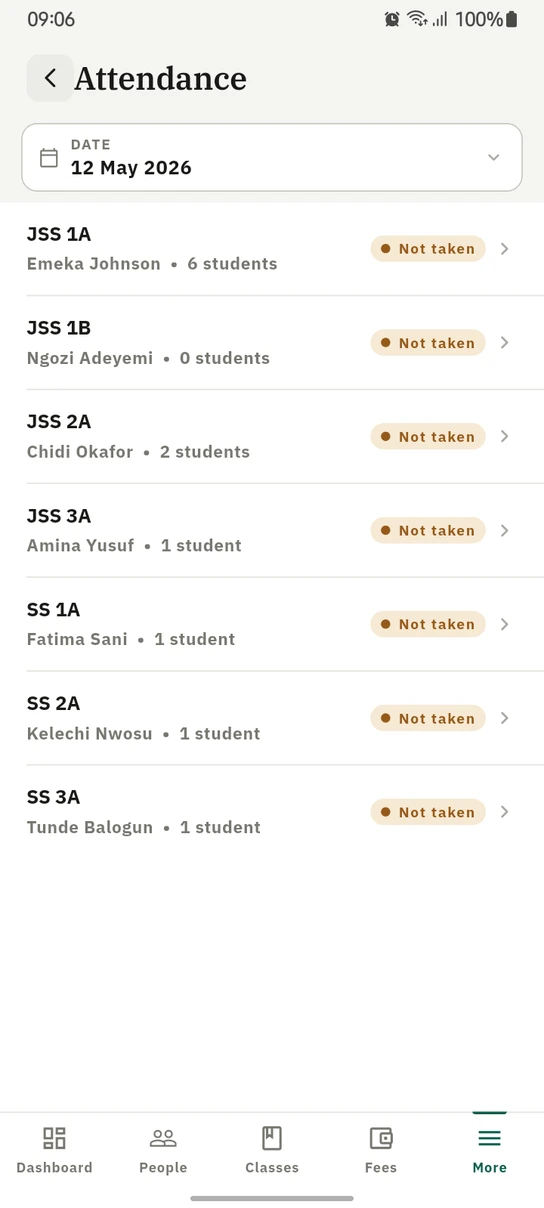
The day's registers on the phone, each class showing whether it has been marked yet.
Ready to try it with your school?
Three-month Basic trial. No card required to register.