
Academics
Marking and the outstanding board
Tick a class off, record a mark and a comment, and see exactly which pupils across the school have not submitted. The list gets built from the roster every time you open it, so nobody has to keep one.
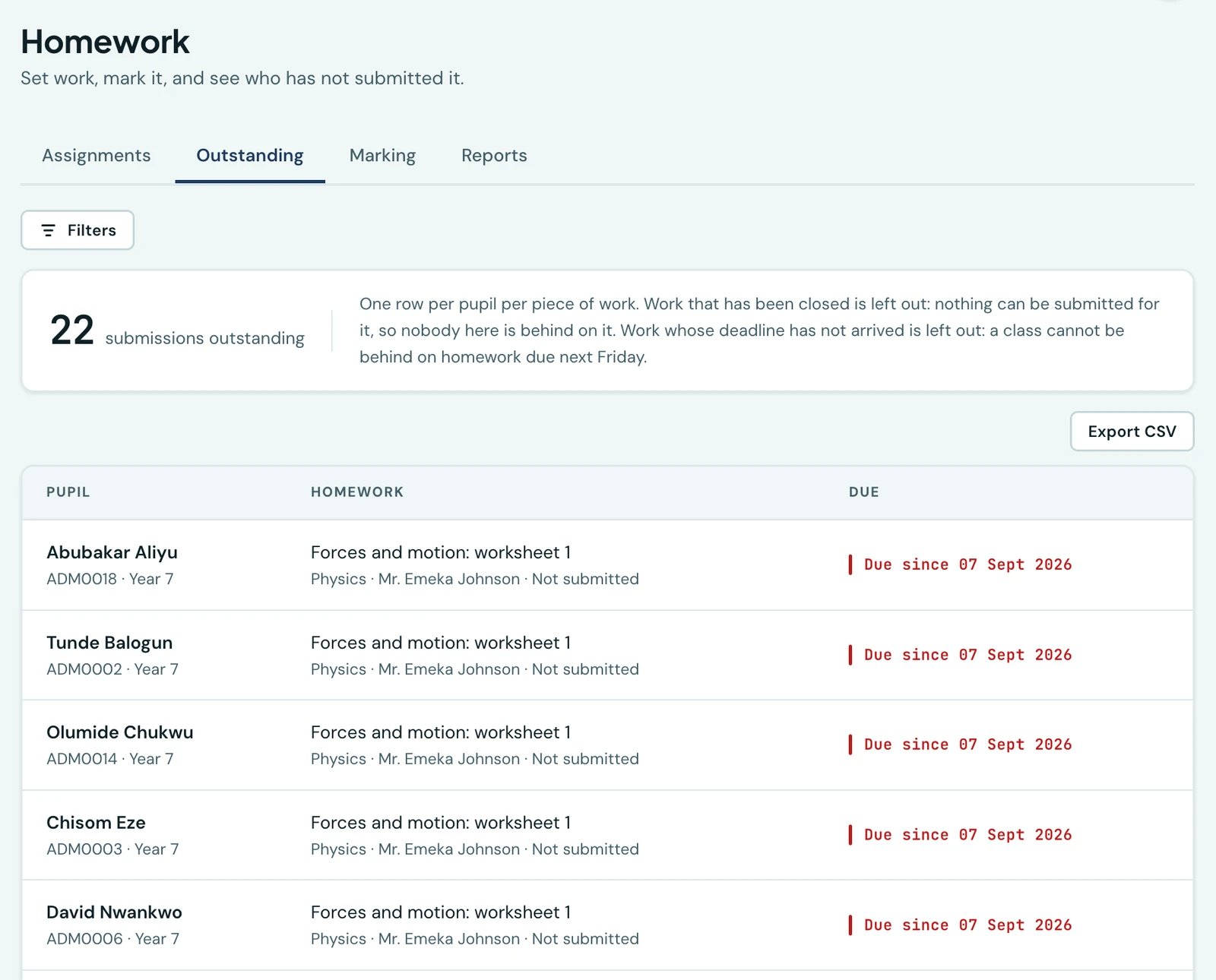
Every school already sets homework. What no school has is the answer to the question that follows on Thursday morning: which twenty-three of these hundred and twenty pupils have not submitted anything? That list gets compiled today by walking round a classroom, and it gets compiled again from scratch the following week.
This is that list, and the screen that fills it in.
Ticking a class off
Open a piece of work and choose Mark. What you get is the whole class: every pupil currently on the roll of every class the work went to, in one list, with a box against each name.
That is worth saying plainly, because it is the difference between this and a list of what came in. A pupil who submitted nothing has a row here. They are the pupils the screen exists for, and a screen built from what was submitted would be a screen with exactly those pupils missing from it.
Against each name you can record:
- Whether they submitted. Tick the box. Late work is shown as late, measured against the deadline as it now stands, so moving a deadline moves what late means rather than leaving thirty rows answering the old one.
- A mark, where the work carries one. An empty box means no mark. A zero means a nought the pupil earned. Those are different things and the platform keeps them apart.
- A comment, in your own words. The pupil and their parents read it.
Untick somebody and their row goes: not submitted is the absence of a record, not a record saying no. The one thing that will not happen is losing a mark to a mis-tap, so a pupil whose work has already been marked cannot be unticked until the mark is cleared first.
A pupil who moves class part-way through
The list is the class as it stands today, which is what keeps it right with nothing for you to keep up to date: a pupil who joins on Wednesday is on Monday's work without anybody adding them.
There is one case that needs saying, because a school will meet it in the middle of a term. A pupil who submits work and then moves class, or leaves, stays on the sheet. They sit at the end of it, marked Left the class, with the class they are in now beside their name, and their mark is still yours to finish or correct. Their family can already read it, so the screen that can change it has to go on showing them. Clear what is recorded against them and they leave the sheet for good.
Only what you changed is saved
The screen sends the rows you touched and no others, and it says how many are waiting before you press Save. That is not a technicality: a pupil marked for the first time has their family told, so a class saved whole every time would send thirty families a second message about a mark they read last week. Correcting a figure afterwards tells nobody again.
Work that is ticked rather than scored is marked by the comment you write on it. Most homework in a school like yours carries no mark out of ten, and a piece of work a teacher has read and written on has been marked whether or not a number came out of it.
The outstanding board
Outstanding is the list itself: one row per pupil per piece of work they have not submitted, with the class, the subject, who set it and when it was due.
A row rather than a count, deliberately. A count tells a school there is a problem; this tells them whose it is, which is the thing a form teacher can act on before break. Tapping a row opens the marking sheet for that piece of work, so ticking somebody off is one step from finding them.
What the board leaves out is as deliberate as what it shows:
- Work whose deadline has not arrived. A class cannot be behind on homework due next Friday, and including it would bury the twenty-three pupils who genuinely have not submitted among two hundred who simply have not got to it yet. There is a switch if you want to see it anyway.
- Work that collects nothing. Reading and revision are set with nothing to submit, so nobody can be outstanding on them.
- Anything still in draft. It has not been given out.
- Work you have closed. Closing a piece of work is you saying it is finished, and nothing can be submitted for it afterwards. A pupil listed against closed work could not act on the row even if they wanted to, so the board stops counting it and the family's own screens stop asking for it.
The board opens on the term you are in, since work set two sessions ago is not what anybody is chasing before break. Widen it by clearing the term, and narrow it by class, subject or teacher. Whatever you have chosen, download the whole filtered list as a CSV for a year-group meeting: the file is the whole list, not the page on screen.
The board is built against your current roster every time it is opened. A pupil who left last term is not on it, a pupil who arrived on Monday is, and nobody has to remember to tidy anything up.
A pupil's homework standing
Reports answers a narrower question: how is this child doing at homework, subject by subject?
Choose a pupil and a term and you get one row per subject: how many pieces of scored work have been marked, and the average across them.
Two things about that figure:
- Only scored work counts. Work you ticked rather than marked out of ten has no percentage to contribute, so it is absent rather than counted as nothing.
- Missing is not zero. Work nobody submitted is absent from the average too. A figure that counted every unsubmitted piece as a nought would tell you about attendance, not about the work.
A homework mark never appears on a report card, and this figure is not written to one. It is here to be read, and typed into the continuous assessment your school already keeps if that is what you want to do with it.
What a family sees
The pupil and their parents see the record: whether it was submitted and when, whether it was late (only for work the pupil handed in through the platform, never for a book you ticked, since the tick records when you marked it rather than when it came in), the mark once there is one, and the teacher's own words about it. They are told the first time a piece of work is marked, in the app, by email and as a notification on the phone, following your school's own notification settings.
They are not told again when a figure is corrected, and nothing about homework goes out over WhatsApp: it is by far the most frequent thing this platform would ever tell a family, and it would exhaust the allowance that fee reminders and receipts depend on.
Who can do what
| Permission | What it allows |
|---|---|
| View homework | Read the marking sheet for work you can see |
| Set and mark homework | Record what a class submitted, and mark it |
| View the outstanding board | See who has not submitted, and a pupil's homework standing |
A piece of work is marked by the teacher who set it. Anybody who may read it can open the sheet and see who submitted and what they got, and the screen says plainly that it is read-only for them rather than offering boxes that refuse to save.
On the phone
Marking is on the phone, which is the point of it being a tick and a short comment rather than a form: a teacher goes down the class with a handset in one hand. The outstanding board is there too, on its own screen, with the same filter and the same rules. The CSV and the school-wide filters by teacher stay on the web, where somebody is sitting down to a meeting rather than standing in a corridor.
Related pages
- Submitting homework online. Photographs of an exercise book, typed answers and files, for the schools whose pupils have a handset.
- Homework reminders. One message a day naming everything a pupil has due, never one per piece of work.
Ready to try it with your school?
Three-month Basic trial. No card required to register.