
Run the whole school from one place.
Fees, students, staff, the register, grades, timetables and report cards, on one platform your bursar can trust with the money and your teachers can use from the classroom. Built for schools that have outgrown the spreadsheet.
Three-month Basic trial. No card required to register.
Schools already running on 1410SMS










Every plan runs the whole platform
Paying more buys a larger WhatsApp allowance and a domain of your own. It never buys a feature that was switched off.
Set up in an afternoon
Register, import your roster from the spreadsheet you already keep, and take the register the same week.
Works on the phones your staff own
A native app for teachers, students and parents, and a browser for everyone else. Nothing to install on a school computer.
Four things a term actually turns on.
The rest of the platform is on the features page. These are the four every school we have spoken to asked about first.
Know exactly what every family owes.
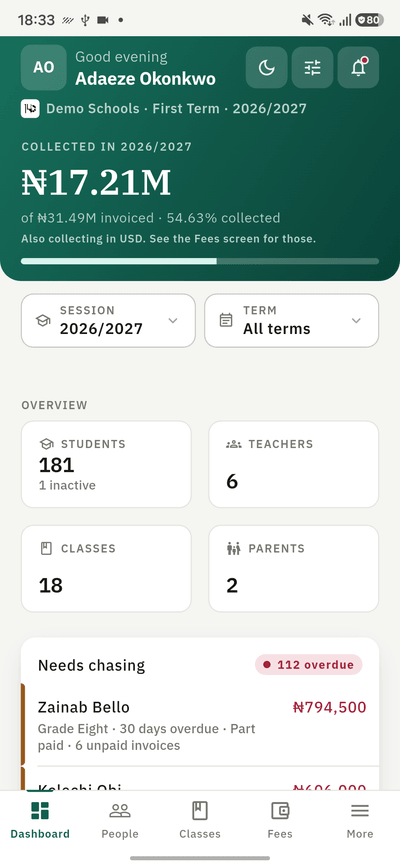
Raise itemised invoices, record payments as they land, and issue a branded receipt for each one. The balance on a child’s record is the balance, not a figure somebody last updated in March.
- Itemised invoices from reusable fee templates
- Receipts and invoices as branded PDFs
- Discounts, refunds and part payments
- Reminders that go out on their own
The register, taken in the classroom.
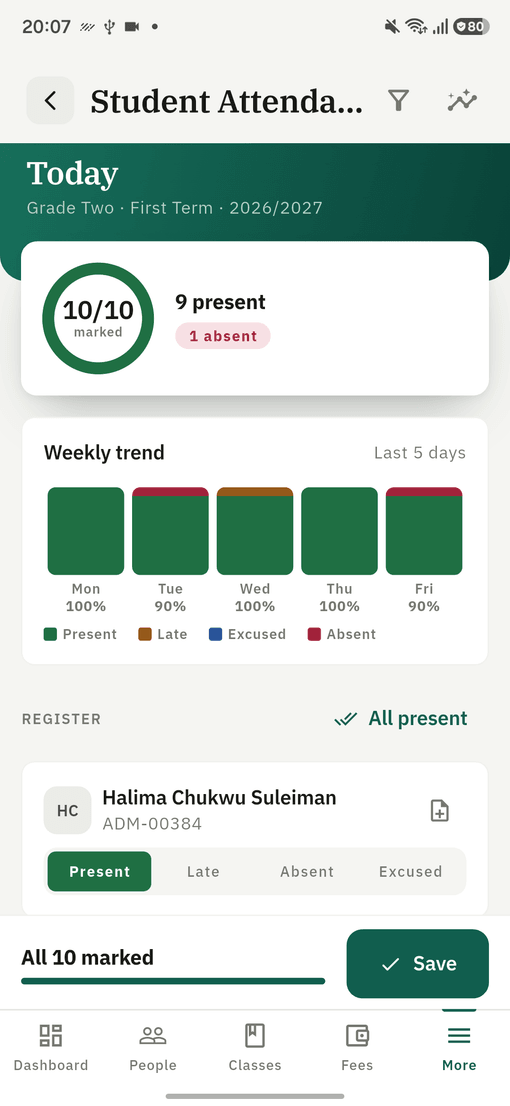
A teacher marks their class on the phone in front of them, and the absence reaches the parent the same morning. Staff attendance runs on the same screen, with leave and a roll call beside it.
- Present, absent, late and excused
- Parents told about an absence automatically
- Attendance rates per class and per child
- Staff punches, leave and roll call
Report cards that come out on time.
Grades go in per subject, the card assembles itself, and you release it to families when you are ready. Design the card once against your own sections and it prints that way every term.
- Bulk entry across subjects at once
- A card your school designs, not ours
- Class broadsheet and positions
- Nothing reaches a family until you publish
A week that does not clash.
Build the timetable from your bell schedule, your rooms and your teachers, and the engine refuses to put one teacher in two rooms at once. Exams are checked against the same rules before they go out.
- Bell schedules, rooms and teaching groups
- Clashes caught as you build, not after
- Every teacher gets their own week
- Exam timetables validated before publishing
And the parts nobody demonstrates until you ask.
Parent communication
Notices, results and fee reminders by email, WhatsApp and push, to a whole school, one class, or one family.
Read the documentationOnline tests
Set a test, let it run to a server-side clock, and mark it as it is submitted. Entrance candidates sit theirs without an account.
Read the documentationRoles and permissions
The bursar sees the money, the form teacher sees their class, and you decide which is which. Every change is written to an audit log.
Read the documentation
The whole school, in a pocket.
One app for staff, students and parents. Teachers take the register and enter grades from the classroom; parents follow fees, attendance and results for every one of their children, across every school those children attend.
- Mark the register in the classroom
- Record and review grades
- Invoices, receipts and balances
- Push notices the moment they happen

The iPhone and iPad app is coming soon.
Try it with one class this term.
Three-month Basic trial, with no card required to register.