
Academics
Clocking Staff In by Roll Call
Tick names off a list and the platform clocks those staff in or out. For the staff who have no smartphone to clock themselves in with, taken on the phone by whoever stands at the gate.
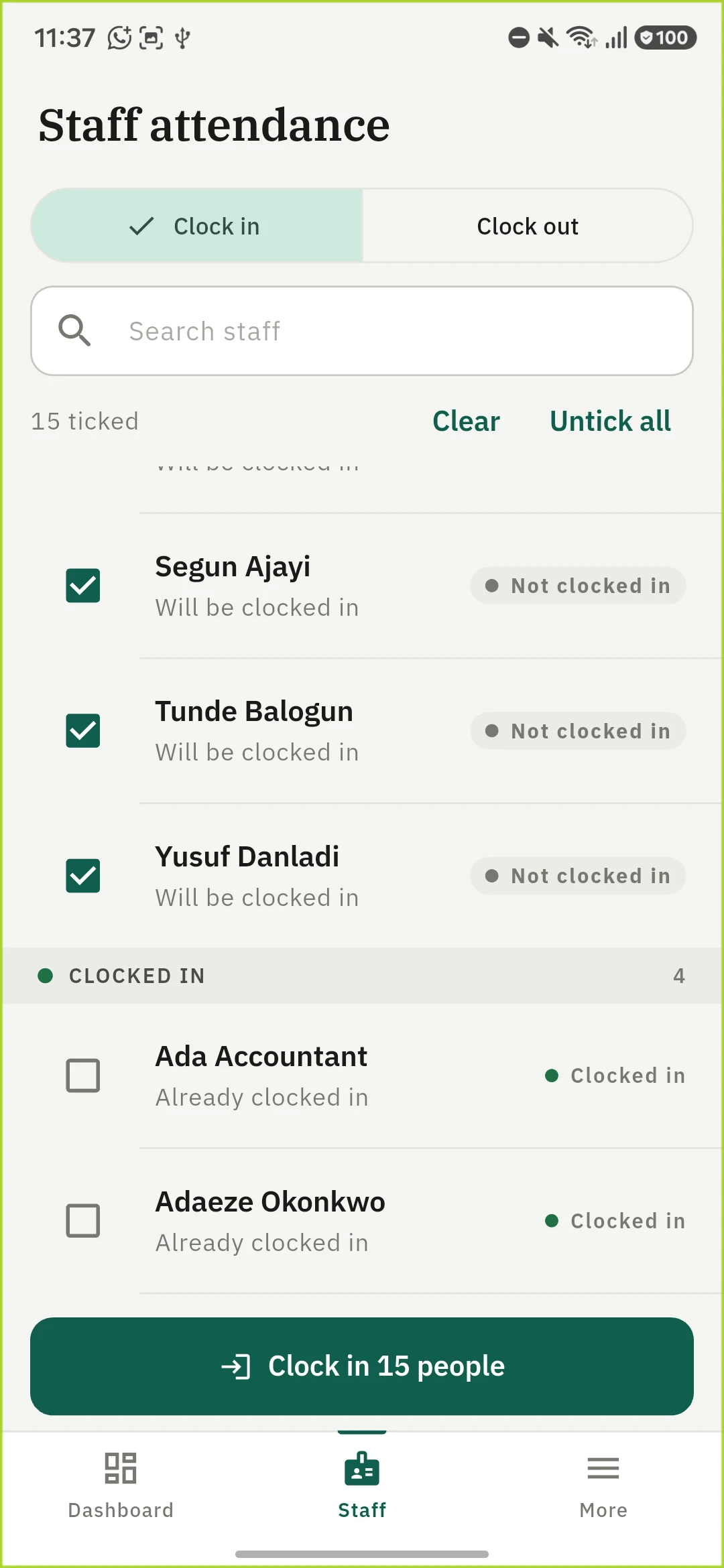
Staff clock themselves in from their own phone. Some of your staff have no smartphone, so there is nothing for them to clock in with. A roll call is how those people get onto the same timesheet as everybody else. Somebody authorised ticks their names off a list, and the platform records what that person attests.
Taking a roll call
More → Staff Attendance → Roll call in the mobile app. This is a screen for somebody standing at a gate, not sitting at a desk, and the phone is now the only place a roll call is taken: see Where it has to be taken below for why.
- Choose the direction. Clock in or clock out. The whole screen changes meaning with it, so the button you have armed is the one that is filled in.
- Tick the names. Search for one, or use Select all, which ticks only the names this press would actually move.
- Press the button. It names the count: Clock in 15. Everybody ticked is recorded at the moment you press.
On the web, Attendance → Staff roll call shows who the roll call has on site. It is a read: the names, and whether each person is currently in, out or excused.
There is no time to set. The time on the record is the school's own clock at the moment the press lands, whatever the computer or phone in your hand is set to. A roll call is taken as people walk through the gate, so now is the answer; a time somebody types is either that same answer retyped or a figure on a colleague's employment record that nothing checked. Where a time genuinely is wrong, an administrator corrects it afterwards. See below.
A note is optional and applies to the whole batch, not to each person. "Morning gate roll call" is the useful sort. It is optional on purpose: somebody clocking forty staff in every morning would otherwise type the same three words forty times a day, and a required field everybody defeats is not a required field.
What the screen tells you before you press
Every name carries what it is now and what this press would do to it. Somebody already clocked in reads Already clocked in, and ticking them changes nothing. The roll is ruled into two headed blocks, the names this press would move first, so a long list does not have to be read a row at a time.
This is why the count on the button is not the number of names on the list. If four of your staff clocked themselves in from their own phones before you got to the gate, the button says 15 rather than 19, and those four stay unticked. A screen that let you tick all nineteen and then reported four failures would be reporting a failure that never happened.
Pressing twice is safe. Each person is decided against their own record, so a second press on a bad connection clocks in whoever the first press missed and leaves everybody else exactly as they were. Nothing is doubled.
One name failing never costs you the rest. If somebody's account was deactivated between the list loading and your press, that one name comes back unrecorded with the reason, the other fourteen are recorded, and the ones that did not take stay ticked so you can press again without rebuilding the list.
Switching between Clock in and Clock out clears your ticks, because the same list of names means the opposite thing in the other direction.
Where it has to be taken
A roll call has to be taken at your school, and the app checks that before it records anybody. This is the one action in staff attendance that puts other people on the timesheet without any of them touching anything, so what the platform checks is the one thing it can: that whoever took it was standing on your grounds.
Nobody on the list is located by this. Their phones are not read, and most of them do not have one. The check is about the person holding the phone that took the roll call.
If the fix is missing, too vague to place anybody, simulated, or outside every location you have recorded, nothing is recorded for anybody and the app says which of those it was. Your ticks stay as they were, so moving closer and pressing again records the same list. Nothing is half written: the location belongs to the roll call rather than to any one name on it.
This is why a roll call is taken on the phone. A computer does not know where it is. It infers a position from its network address or the wifi around it, which indoors is routinely streets out and often unavailable altogether, so a reading from a desk would either be refused or, worse, accepted while proving nothing. The web page shows what has been recorded and does not record.
Schools set up before this existed have it on. A school taking a roll call is at the school, so this starts on rather than off, and where it is not true you find out on the first attempt rather than in an audit six months later. You can turn it off under Settings → Attendance, Roll call must be taken on your grounds, which means a roll call can then be taken from anywhere, for anybody.
If a roll call genuinely has to be recorded from somewhere else, that is a correction: a different record with a required reason, made by an administrator from the Staff tab.
A roll call is today's, and always attested
Two rules define what this is, and both are worth knowing before you hand it to somebody.
It records now, and nobody types the time. Not yesterday, not last week, not half past seven when it is ten to nine: the platform stamps the moment of the press, on your school's own clock rather than wherever our server happens to be. A roll call is somebody saying I can see these people, which is only true right now. Recording last Tuesday, or fixing a time that is wrong, is a correction: a different record, with a different permission and a required reason, which an administrator makes from the Staff tab. Whoever takes your roll call has the one permission and not the other, so they can neither choose a time nor change one; without that, the narrow permission below would quietly be the power to write two years of attendance for your whole school.
It is attested, not measured, and every screen says so. When a member of staff clocks in from their own phone, the platform has checked that it is their phone and, if you have set one, that they are at your school. A roll call checks where the person taking it is standing and nothing about the people on the list: the fact being recorded is that somebody says they saw them. So it is marked as such everywhere it appears. The timesheet prints Recorded on a roll call in its Notes column and totals Of which attested underneath, and the payroll export carries a column for it.
That marking is the honest part of this feature, and it is deliberately not flagged as something needing review. A school whose cleaners are clocked in by the bursar every morning would otherwise have every one of their days flagged forever, which trains everybody to ignore the column that catches the real problems.
Who may take one
There is a permission of its own for this, Take staff roll call, so that taking the register at the gate does not mean being handed everybody's timesheets.
Your Owner and School Administrator hold it, and so does an HR Officer, who could already record attendance for other people. There is also a role that holds this permission and nothing else at all: Attendance Officer. It is meant for whoever actually stands at the gate, and it is what you give a head of security or a receptionist. Somebody holding that role and nothing more gets exactly this screen and no more of the staff attendance area: on the phone it opens with no tabs beside it, because none of the others are theirs.
What they can see is deliberately less than the board shows. The roll call list carries names, whether each person is currently on site, and whether they are excused today. It does not carry hours worked, arrival times, lateness, or the reason somebody is on leave. That somebody is away is what stops you ticking them by mistake; that they are away for a medical appointment is what the board's own permission exists to protect. Handing out the roll call is not a way round that.
The people this is for, and their accounts
Somebody with no smartphone usually has no work email address either, and the platform does not require one. A member of staff can be given an account with just a phone number, or with neither, in which case they cannot sign in but can still be rostered, clocked in on a roll call and paid. See Staff without an email address.
What a roll call does not do
- It tells nobody. Staff are not notified that they were clocked in by somebody else. By definition these are the staff with no smartphone and often no inbox, so a message would reach nobody it is about, and a school clocking forty people in each morning would generate forty notices a day. The record is the notice here, which is what the attested marking is for.
- It is not a kiosk. A screen at reception showing a rotating code, so staff can clock themselves in without a phone of their own, is a separate thing and is not built yet.
- It does not close a forgotten day. If somebody is clocked in on a roll call and nobody clocks them out, the ordinary forgotten clock-out rule closes the day off at your school's cut-off time, marked as an estimate as usual.
On the phone
A roll call is taken on the mobile app and nowhere else. Open More → Staff Attendance and the Roll call tab; for somebody who holds only the Attendance Officer role, Staff Attendance is the Staff tab in the bottom bar. Choose Clock in or Clock out, tick names or use Select all, then press the button, which names its count, for example Clock in 15 people. The confirmation offers an optional note for the whole batch.
The school-grounds check is made on that press, against the phone taking the roll call. It can be switched off from the phone too, under More → Settings → Attendance.
Ready to try it with your school?
Three-month Basic trial. No card required to register.