
Portals
The School Calendar for Parents & Students
Parents and students see the school's own term dates, holidays and events, on the web and in the app, without anyone having to send them out.
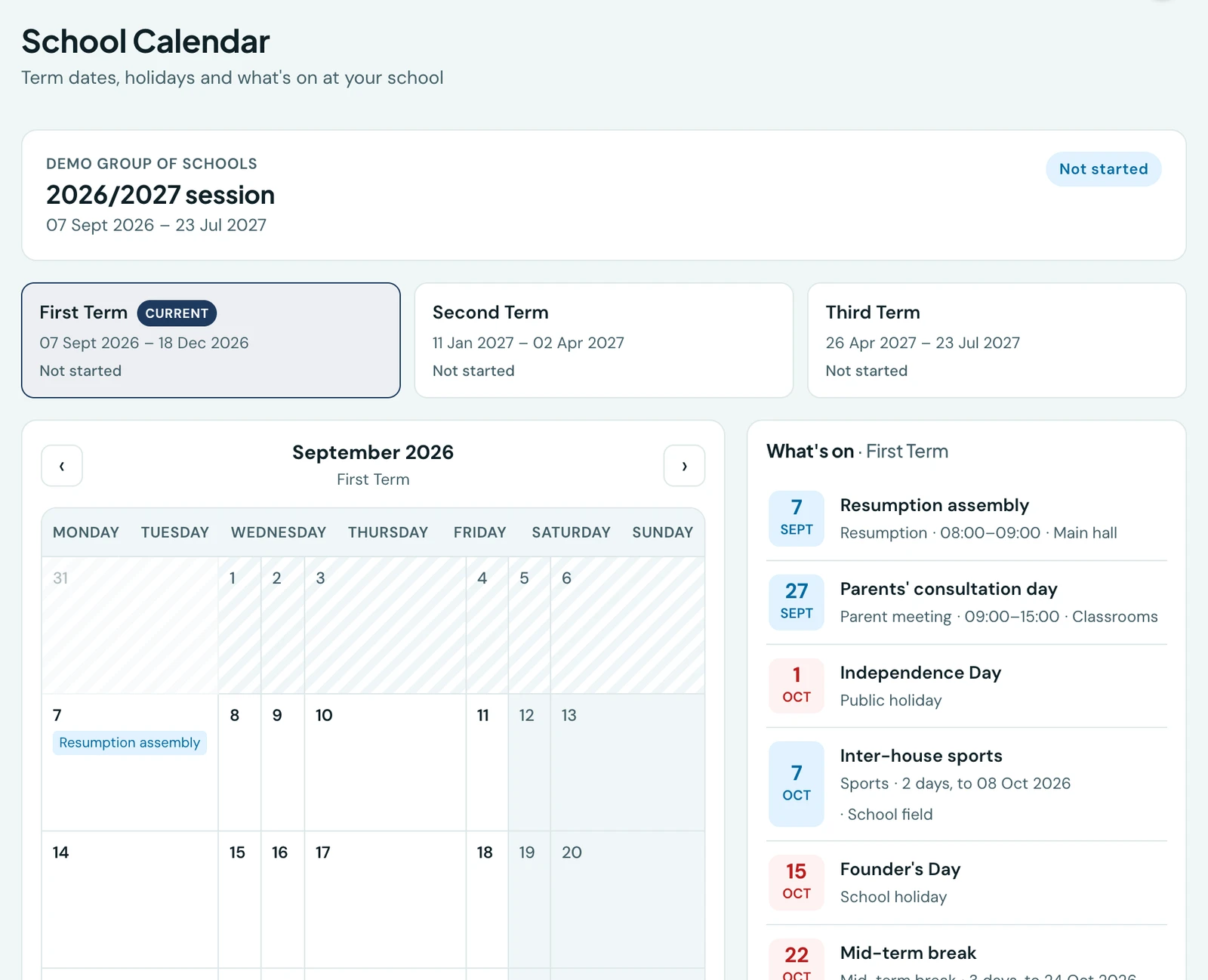
Every school spends the first fortnight of term answering the same three questions: when does term end, when is the school shut, and what time is the open day. 1410SMS answers them from the calendar the school has already set up, so nobody has to print a letter or repeat a date down the phone.
Parents and students see the same calendar the school does. It is not a copy, a summary or a separate list somebody has to keep in step. The term dates, the holidays and the events all come straight from Academic Calendar in the school's own sidebar, so the moment the office records a mid-term break, every family has it.
What a family sees
- The session and its terms. The school year, when each term runs, and which term the school is working to now.
- Holidays. Every day the school is shut, including the public holidays that come round every year.
- Events. Resumption, open days, sports, parents' evenings, prize giving: what it is, when, how long it runs, what time it starts, and where.
Multi-day things are shown as such. A five-day mid-term break reads as five days, not as one entry on the Monday.
Where to find it
| Who | Where |
|---|---|
| Student, on the web | School Calendar in the sidebar |
| Student, in the app | More → Academics → School Calendar |
| Parent, on the web | Open a child, then the Calendar tab |
| Parent, in the app | Open a child, then the Calendar tab |
A parent reaches it through a child because the calendar belongs to a school. A parent with children at two schools on 1410SMS opens each child to see that school's year.
The web dashboards carry the calendar too. Parents and students get an Upcoming Events card with the next events and closures at the school, soonest first, cancelled ones marked rather than hidden, and a link to the full calendar. A School Calendar card says where today falls, such as Week 4, First Term or a closure, using the school's own date rather than the phone's or computer's. Staff see it on their dashboard; parents and students can add it from Customise.
Keeping an event to yourself
Not everything a school arranges is a family's business. A staff training day, a moderation session, a governors' meeting: all of them are events, and none of them is something to publish.
When you add or edit an event there is a Show this to parents and students tick, and it is on by default. Untick it and the event stays on the staff calendar and appears nowhere else. The events list marks those with a quiet Staff only badge, so you can see at a glance which is which.
Two things are worth knowing about what a family is sent:
- An event's Notes are never shown to a family, whether the tick is on or off. Notes are where staff write what a trip costs or what to prepare, and that is what they stay.
- Holidays have no tick. Whether the school is open is not something a school can decline to tell the people it is shut to.
When something is cancelled
Cancel an event rather than deleting it and the family calendar keeps showing it, struck through and marked Cancelled, with your reason underneath if you gave one. A parent who put Saturday in their diary sees why it is off, which an event that simply vanished could never tell them.
By default they are notified as soon as you cancel, on the app and in the notification centre. A new event or a moved one is not announced the moment you save it: it is there when they next open the calendar, and a notification for every edit would teach people to ignore the ones that matter.
A reminder a day or two before
Families do not have to remember to look. On the evening before something is coming up (two days before, by default), every family in the school is sent one reminder naming everything that is about to happen: the events they can see and the days the school is shut.
- One message an evening, however much is coming up. A closure on Friday and an open morning on Saturday arrive as one reminder naming both, not two notifications.
- Each thing is announced once. A mid-term break is not announced again every evening until it starts. A closure you record at short notice is still announced the next evening, as long as it is at least a day away.
- Only closures that change something. A public holiday that falls on a Saturday, or in the long vacation, does not shut the school on a day it would have been open, so families are not told about it.
- Only events families can see. A staff-only event is never included, and nor is a cancelled one, which has already had its own notice.
- Not the weekly routine. An event that repeats every week, such as Friday assembly, is never included: families know it is on, and a reminder every week would bury the ones that matter. An event that repeats monthly or yearly is announced each time it comes round.
It goes out at six in the evening, in your school's own timezone, in the app, by push and by email. Turn it off, or change how many days ahead it goes (one to three), under Academic Calendar → Settings → Family reminders. Which channels it uses is set with the rest of your notifications, as Calendar reminder. It is never sent over WhatsApp, because it goes to every family in the school on the same evening.
What families cannot do
Nothing on the family calendar is editable. There is no request form, no "add to my calendar" that writes back, and no way for a parent to comment on a date. It is the school's record, read.
Before it works
The calendar needs term dates. A school that has not dated its terms yet will show families a note saying the academic year has not been set up, rather than an empty page.
Set them under Academic Calendar → Terms & Sessions: see Academic Calendar, Terms & Sessions.
On the phone
The same calendar is in the mobile app. A student opens it from More → School Calendar; a parent reaches it through a child, on the Calendar tab of that child's record, because the calendar belongs to a school and naming a child is how a parent picks one. That matters for a parent with children at more than one school: each child's tab shows that child's school year, not a merged one.
The session and its dates head the screen, the terms are a row of chips, and the term's closures and events are listed under the month they fall in, each with its date, how long it runs, and the time and place where the school gave them. Closures and events are colour-coded but sit in one list, so a mid-term break and a sports day read as what they both are: days to plan around.
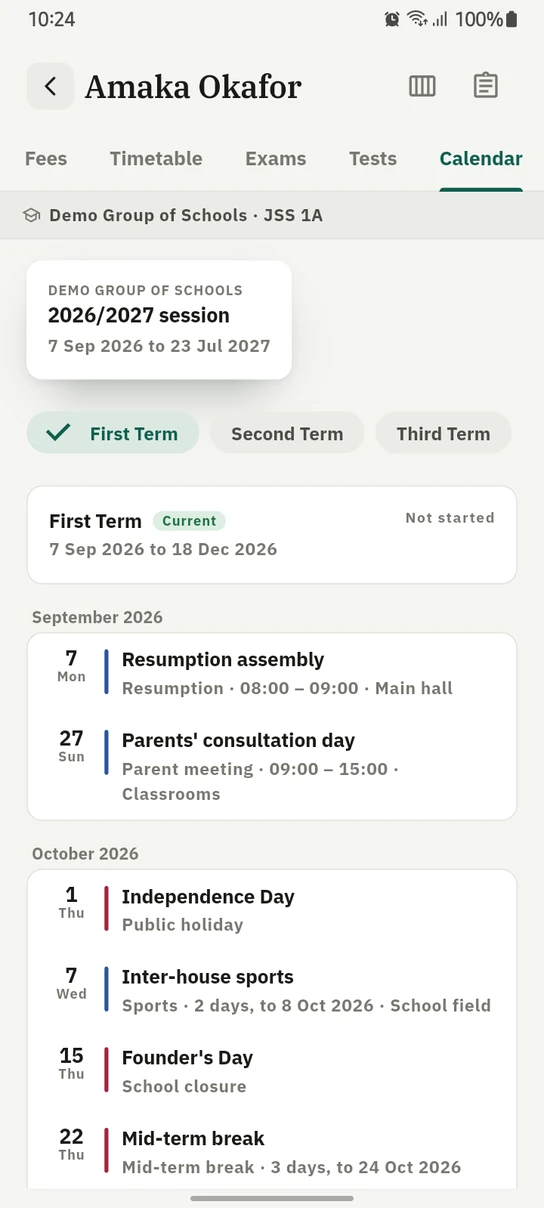
A child's school year on the phone, closures and events in one list under the month they fall in.
Ready to try it with your school?
Three-month Basic trial. No card required to register.