
Advanced
Deleting an Account
Staff and parents delete their own 1410SMS account from their profile, on the web or in the app. A pupil asks their school, and a school's owner can delete the whole school.
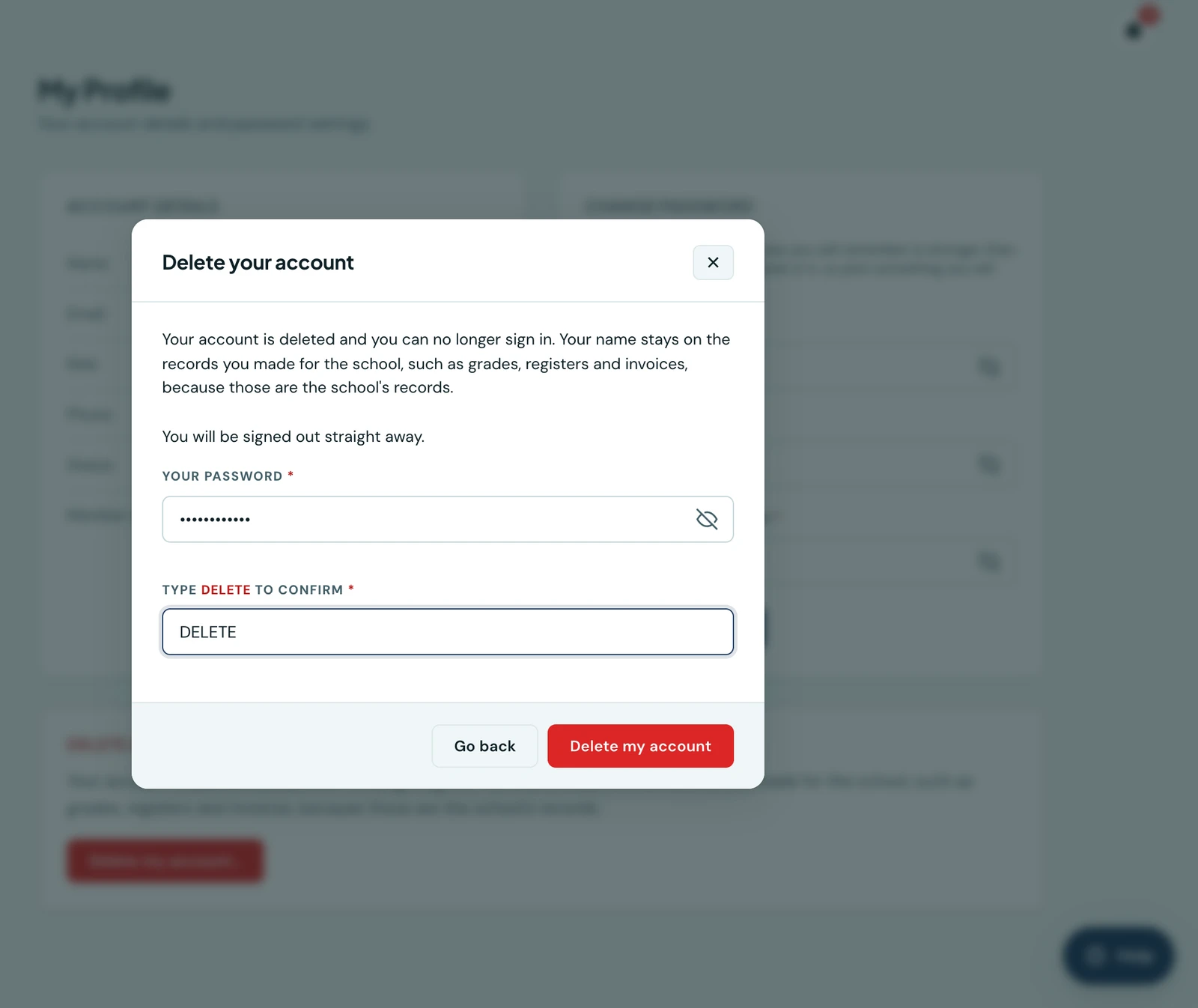
Everybody with a 1410SMS account can delete it themselves, from their own profile, in the web portal or in the mobile app. Nobody at the school has to approve it, and nobody at the school can stop it.
Every deletion asks for two things: your password, so that a phone left unlocked on a desk cannot be used to delete somebody else's account, and the word DELETE typed in full, so that the button is never pressed by accident.
Staff
Open My profile and choose Delete account (in the app it is also under More → Account). Your account is deleted straight away and you are signed out on every device.
What happens to your name depends on whether you did any work at the school:
- If nothing at the school names you, the account is removed entirely.
- If you recorded marks, took registers, issued invoices or did other work, your name stays on those records, because they are the school's records and a school reading last term's marks needs to know who entered them. Everything else goes: your sign-in, email address, phone number, devices, sessions, notifications and settings. The account cannot be reopened; if you come back, the school creates you a new one.
The school's administrators are told that you deleted your account, so a sign-in that no longer works is not a mystery to them.
The school's owner
A school always needs at least one owner (a primary admin). If you are the only one, your account cannot be deleted until another administrator is made a primary admin, or until you delete the whole school.
Parents
Open Account settings and choose Delete account (in the app it is also under More → Account). Your account is deleted straight away, at every school your children attend, and you are signed out on every device.
You are unlinked from all of your children. If a school issued you an invoice or a receipt, your name stays on it, because it is part of the school's financial records; nothing else about your account is kept. Each school is told which of its pupils no longer has you on file.
From then on, 1410SMS sends you nothing: no messages, reminders, invoices, receipts or alerts, from any school, by email, WhatsApp or the app. Where a school had your email address or phone number written on a pupil's record, as the guardian's contact or the pupil's own, it is removed. If a school sends a message to that address later, it is not delivered, and the school sees that the recipient deleted their account. This lasts until a school deliberately adds you again as a parent with a new account.
Pupils
A pupil's account belongs to the school, along with their marks, reports and fees, so a pupil cannot delete it outright. Open My profile and choose Request account deletion instead. The request goes to the staff at your school who are allowed to delete pupils, and your profile shows the date you sent it.
If the school agrees, it deactivates you and schedules the deletion, which completes seven days later. The school may need to keep a record that has an invoice, a payment or released results on it.
Deleting the whole school
An owner can delete the school itself from My profile → Delete school. This is permanent: every pupil, parent link, mark, invoice, file and staff account at the school is erased.
It does not happen at once:
- The deletion is scheduled for 30 days later.
- Every owner is emailed straight away, including the one who scheduled it.
- Every member of staff sees a notice at the top of the portal until the day it runs.
- Any owner can cancel it at any time before then, and every owner is emailed again.
A school whose subscription has lapsed can still delete itself.
Without the app
Everything on this page works in the web portal at your school's address, so you do not need the app installed to delete your account. If you cannot sign in at all, email [email protected] from the address on the account and we will help.
On the phone
Deleting your account works the same way on the mobile app. Open More → Delete account, or More → My profile and scroll to the foot of it. Enter Your password, type DELETE in the box below it and press Delete my account. If you are the school's only owner, the screen says so and what to do first.
An owner also sees a Delete school section on the same screen. Once a deletion is scheduled, the section shows the date it will run and a Cancel the deletion button, and every member of staff sees the date in a banner at the top of the app until the day it runs.
Ready to try it with your school?
Three-month Basic trial. No card required to register.