
Communication
Choosing How You Are Told
Parents choose whether each kind of school notice reaches them by app notification, email or WhatsApp, once for every school their children attend, while the notices that matter most always get through.
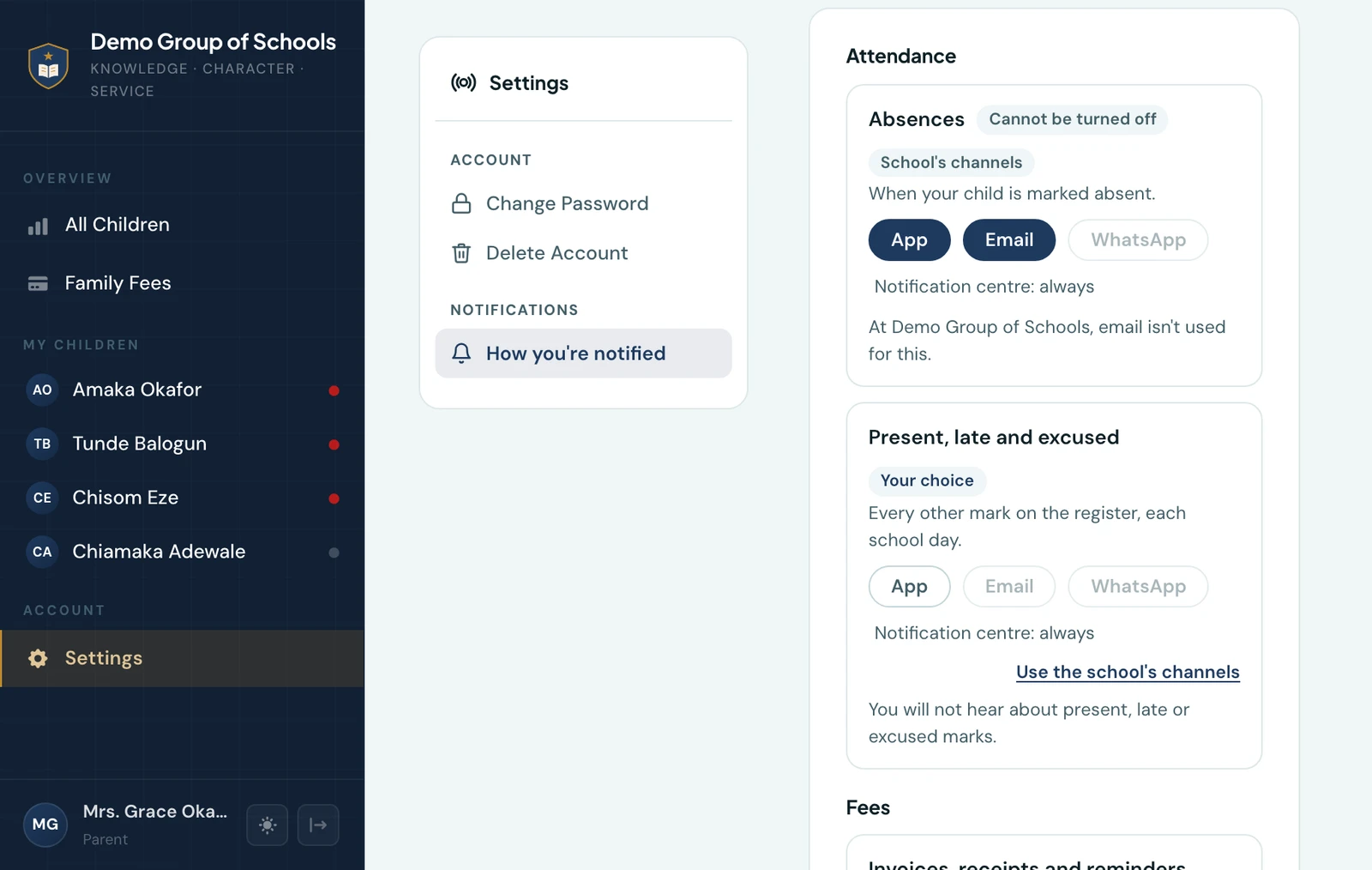
A parent decides how each kind of notice from the school reaches them: by app notification, email, WhatsApp, or a mix. One household can split the work, with fees going to whoever pays them and learning updates to whoever follows the schoolwork, and a parent who wants less noise can have it without missing the notice that matters.
The choices are in Settings → Notifications, in the parent portal and in the mobile app. Most parents never open them, and nothing changes for anyone who does not: they are sent exactly what the school sends.
What you can choose
There is a row for each kind of notice, with a switch for each channel:
| Row | What it covers | Can it be turned off? |
|---|---|---|
| Absence | A child marked absent | No |
| Attendance marks | A child marked present, late or excused | Yes |
| Fees | Invoices, receipts, voided receipts, refunds, cancellations and fee reminders | No |
| School messages | Every message the school sends to all parents, a class or you | No |
| Calendar and closures | Term dates, holidays, events, closures and cancelled events | No |
| Results and reports | Report cards released and a released result corrected | No |
| Exam changes | A paper in a published exam timetable moved or dropped | No |
| Exam timetables | A new exam timetable published | Yes |
| Learning updates | Weekly marks, homework, class resources and hifdh milestones | Yes |
A notice that cannot be turned off can still be moved. You choose which channels carry it, but you must keep one that actually reaches you. "Reaches" is meant literally: app notifications count only if the app is installed and has been opened in the last month, email only if mail to your address is being delivered, and WhatsApp only if messages to your number are being delivered. Switching off the last one that reaches you is not allowed, and the screen says why.
Each row says whether it follows the school's channels or your choice. A row you have changed has a Use the school's channels link that puts it back, so a channel the school starts using later reaches you without you having to switch it on.
The notification bell is not one of the switches. It always records what the school sends, so anything you chose not to be sent elsewhere is still there when you look.
Account and security messages, such as a password code or a new child linked to your account, are always sent. The weekly digest keeps its own switch, on the same screen.
One choice for every school
If your children attend more than one school on 1410SMS, your choices apply at all of them: it is your phone and your inbox either way. Each school still decides which channels it uses, so where a school does not send something on WhatsApp, the screen says so beside that row ("At Greenfield, WhatsApp isn't used for this").
Replying STOP on WhatsApp
Reply STOP to any school message on WhatsApp and that number gets no more WhatsApp messages from the school, whichever school sent them. Notices that cannot be turned off then reach you by email or the app instead, and your choices are kept as they were. Reply START, or press Restart WhatsApp in your settings, to have them again. Only you can restart it: the school office cannot do it for you. A password code you ask for is still sent, because you asked for it.
Unsubscribing from emails
School messages and the weekly digest carry an Unsubscribe link at the foot of the email, and most mail apps show their own unsubscribe button beside the sender. Either one works at once.
- The weekly digest is switched off for you. You can switch it back on in your settings.
- School messages cannot be turned off, so unsubscribing moves them off email rather than stopping them: they come by the app or WhatsApp instead. This works only if one of those reaches you. If email is the only way your school can reach you, it stays on and the page says why. A message your school sends by email alone is still emailed.
Receipts, invoices, password codes and other notices about your own account have no unsubscribe link, because they are not bulk mail. To change how those reach you, use your settings.
A guardian whose address is on a pupil's record, with no parent account, can use the same link. It stops that kind of email to their address from every school on 1410SMS.
If the school changes it for you
A parent without a smartphone can ask the school office to change these choices for them. Because the choice applies at every school, you are told each time, in the app and by email, with the name of the school that made the change. You can change it back yourself at any time.
What a notification shows on your lock screen
App notifications say whose child and what kind of notice, never a figure. A fee notification does not show the amount, a marked homework notification does not show the mark, and an attendance notification reads "Attendance notice for Ada" without saying which mark. A shared family phone's lock screen is read by everyone in the house; the details are one tap away, behind your sign-in.
Ready to try it with your school?
Three-month Basic trial. No card required to register.