
Academics
Exam Documents
Print an exam timetable for a class, an invigilator or a room, and the attendance sheet each paper is registered on: the class roster with a signature column.
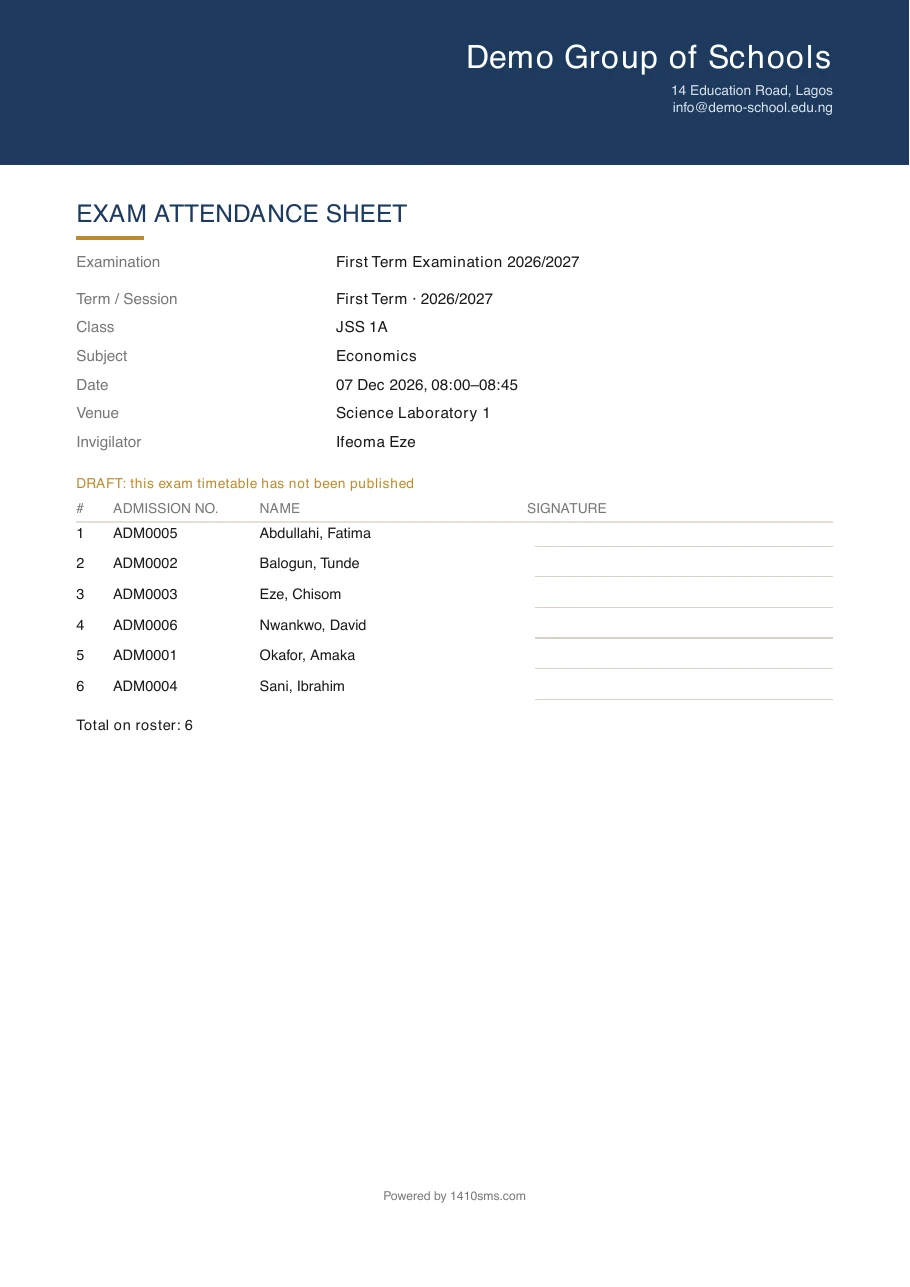
An exam lives on a screen right up to the morning it is sat, and then it needs to be on paper: in a hall with no computer, in a staff pigeonhole, on the noticeboard outside the exam room. Four documents cover it, all in your school's own colours and all one click from the exam.
A class's timetable
Every paper one class is sitting, in the order they will sit them: date, time, subject, venue and who is invigilating. This is the sheet that goes on the form room wall and into a pupil's folder.
The class is named once at the top rather than repeated on every line.
An invigilation list
Every paper one teacher is watching, across all classes. Nobody could get this before, which meant an invigilator's duties existed only inside the full series and had to be picked out of it by hand.
It names the class on each line, because where to be is the question the list is being asked. It does not repeat the invigilator's own name, for the same reason a class sheet does not repeat the class.
A teacher can print their own without any extra permission. It is their duty roster, the same way their teaching week is theirs. Printing somebody else's needs the exam-documents permission below.
A room's day
Every paper sat in one room over the whole series. A hall running back-to-back papers for five days is being managed by somebody, and this is what they pin to its door.
A room is matched by the room itself, never by a typed venue name, so two rooms a school happens to have described with the same words do not end up on one another's sheet.
The attendance sheet
One paper, one sheet: the class roster with an admission number, a name and a ruled signature line per pupil, and the total at the bottom.
The roster is read at the moment you print it, not fixed when the timetable was drawn up. A pupil who joined the class last week is sitting the paper, and a sheet built from an older roster would leave the invigilator nowhere to put them.
The total is printed for the same reason: a register that quietly stopped short is a register missing whoever came last alphabetically, and nobody checks a printed list against a count they were never shown.
Unpublished exams print, and say so
You can print any of the four before the exam is published, which is exactly when you most want to check it. The sheet carries a line in your school's accent colour reading DRAFT: this exam timetable has not been published.
That stamp is the point. Paper outlives the screen it came from, and an unpublished timetable that looked identical to the live one is the timetable a class ends up turning up for.
On the phone
All four print from the app as well, so an invigilator can have their duty roster on the way in and an exams officer can hand over an attendance sheet without going back to a desk. Open Exams, tap the series, then the print icon in the top right: pick what you want, pick the class, invigilator, room or paper, and it opens your phone's ordinary share sheet, which can save it to Files, mail it or send it to a printer.
What the phone offers you is built from the papers actually in the series, so you are never given a choice that leads nowhere: a school that has not named any rooms is not offered a room's day, and where a series has only one class the app skips the question and prints it. My invigilation duties is there for every member of staff, since it is their own roster; the other three appear only if you hold the printing permission.
Who can print
Printing exam documents is its own permission, separate from viewing exams. Reading a series on screen is a member of staff looking something up; printing an attendance sheet is taking a class roster out of the office, and a school that wants the second held tighter than the first can now say so.
The one exception is a teacher's own invigilation list, which needs no permission beyond having been put on the papers.
Ready to try it with your school?
Three-month Basic trial. No card required to register.