
Academics
Scheme of Work
What each class is meant to cover, week by week, laid out before the term starts. One plan per subject per class, written once and copied onto the other arms, with a report that lines it up against the notes actually filed.
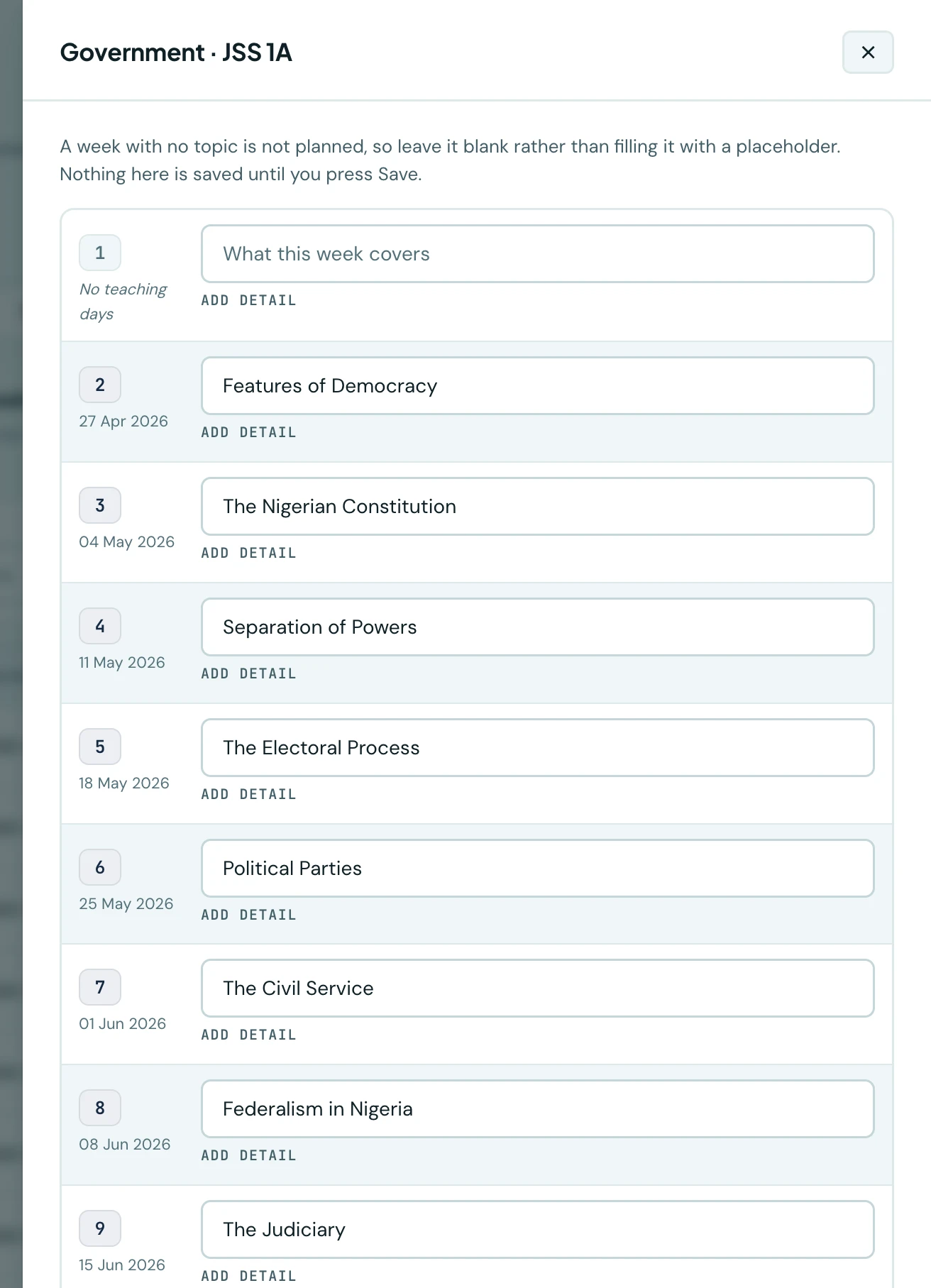
A lesson note records what was taught last week. A scheme of work says what is meant to be taught for the next thirteen. Most schools write one, in a document, once, and nobody looks at it again until somebody asks in week 9 whether Mathematics is behind.
This page is that document, kept somewhere it can be answered from.
Plans live under Teaching in the sidebar, in two of its tabs: Scheme of work and Coverage.
One plan per subject, per class
This is the one thing to know before you start, and it is the opposite of how lesson notes work.
A lesson note covers several classes at once, because a teacher teaches the same lesson to 1A, 1B and 1C and writes it up once. A scheme of work is per class, because arms diverge: 1A gets through Federalism in week 8 and 1C does not reach it until week 10, and a plan that could not say so would be a plan nobody trusted by half term.
So JSS 1A Government, JSS 1B Government and JSS 1C Government are three plans. You write one and copy it onto the other two, which takes about four seconds. Copying is not an afterthought here; it is the reason writing the first one is worth doing.
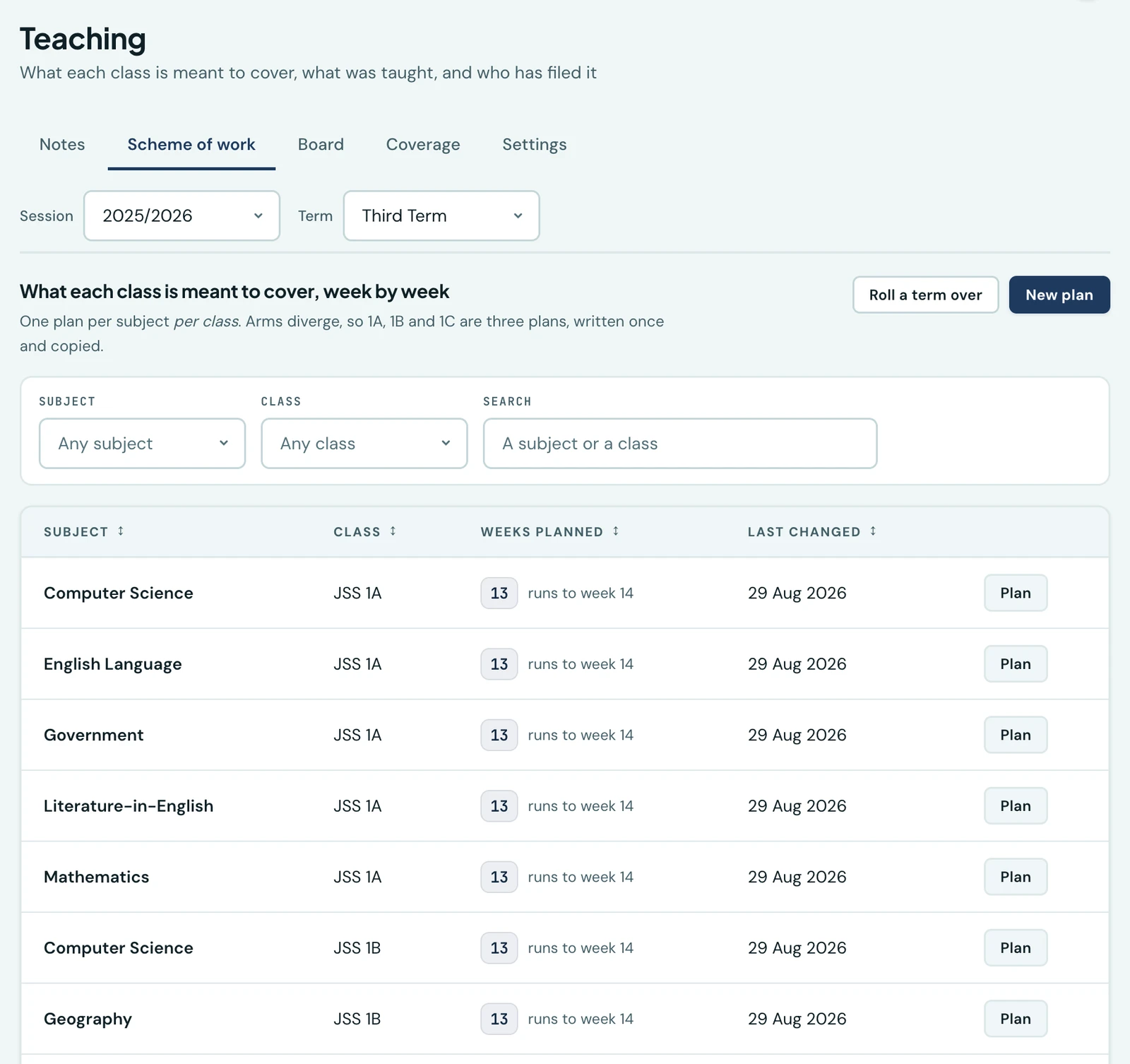
The term's plans. The count and the week it runs to are two different facts: eleven weeks planned that stop at week 7 is a different state of readiness from eleven that stop at week 13.
Writing one
New plan asks for a subject and a class, and nothing else. You get an empty term and fill it in.
The rows are the term's own weeks, taken from your academic calendar rather than counted to a number somebody typed. So a term of fourteen weeks has fourteen rows, dated, and a week the school was shut says No teaching days where its date would be. You can still plan that week if you are running revision through it. Nothing stops you. The grid just does not pretend it is an ordinary Monday, and the lesson-note board will not ask anybody for a note against it.
A week with nothing in it is not planned. Leave it blank rather than typing "TBC" or "Revision" to fill the gap: a blank week is a gap the coverage report can see, and a placeholder is a gap it cannot.
Each week takes a topic, which is the line everything else works from, and optionally a detail: sub-topics, an objective, a page range, whatever your school puts in its scheme. Add detail opens the box; leave it closed and the week is just its topic.
The whole term saves as one form. Nothing is written until you press Save.
Copying, which is the point
Three copies, all the same button, differing only in what you set.
| What you want | What to set |
|---|---|
| The other arms of the same year, this term | Tick the classes. Leave the term alone. |
| The same class, the same term next session | Tick that class. Set the session. |
| A whole term, every subject and class at once | Roll a term over, below. |
Nothing already planned is overwritten unless you ask. A class that already has weeks is skipped and named back to you, so you can tell which arm still needs doing. Tick Replace plans that already have weeks when you do mean to overwrite, which is mostly when you are correcting a copy you just made.
If the term you are copying into is shorter than the one you are copying from, the weeks that do not fit are dropped and you are told how many. Twelve weeks into an eleven-week term writes eleven and says so, rather than refusing the whole copy and leaving you to type the other eleven by hand.
Rolling a term over
Roll a term over copies every plan of one term into another in one action. It is how the second year costs an afternoon rather than a fortnight, and it is why anybody writes the first year's plans properly.
It is off-limits to anyone without the school-wide planning permission, because it acts on every subject and class at once and somebody scoped to their own three could not describe what it would do. Overwriting is off by default here too, so running it twice does not flatten the edits made between the runs.
Coverage: how far behind are we
The Coverage tab is the reason the plans are worth keeping.
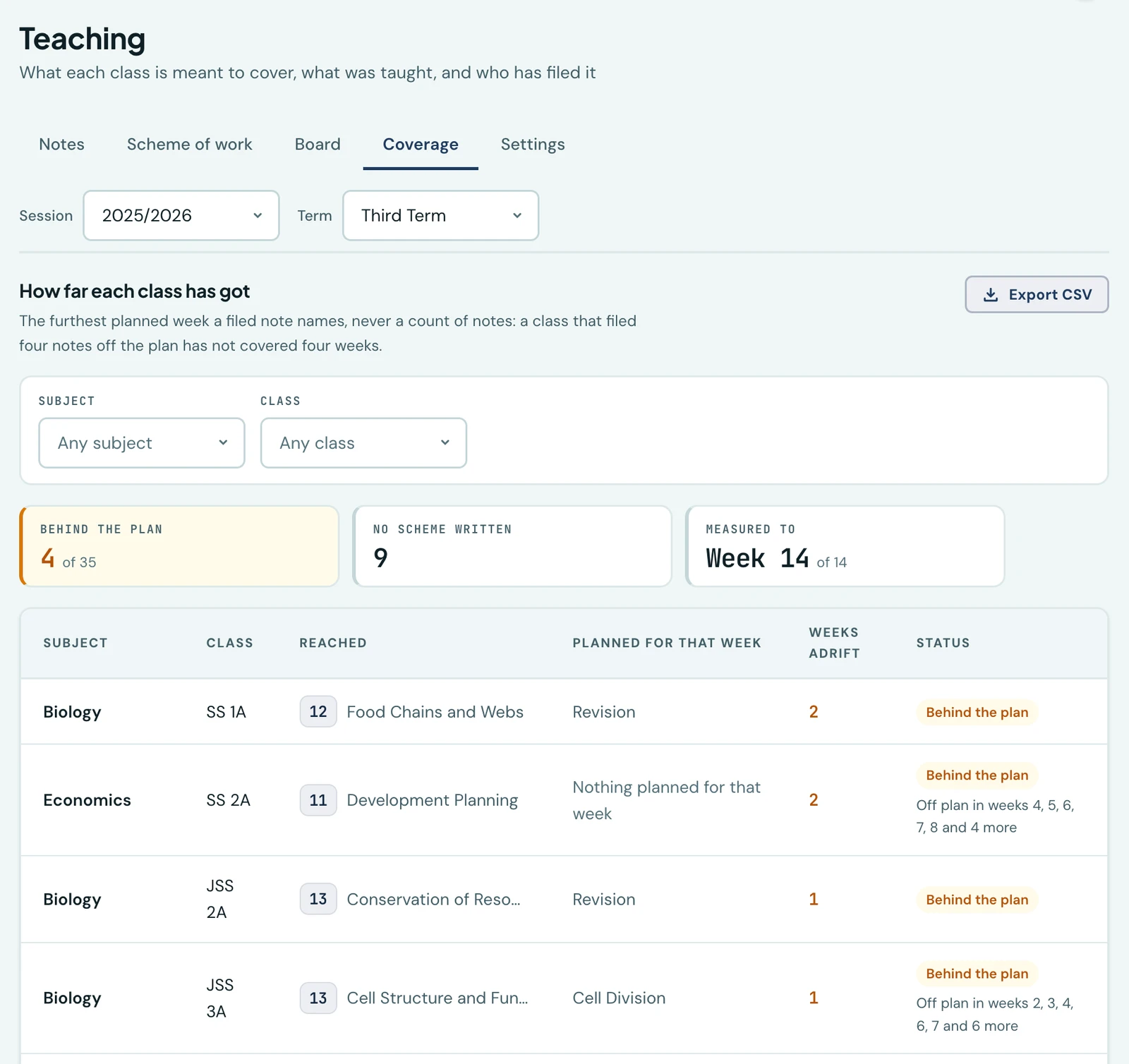
It lines each plan up against the lesson notes actually filed, and the rule it turns on is that progress is the furthest planned week whose topic a filed note names. Never a count of notes. A class that files a note every week and spends three of them on week 4's topic is exactly what this exists to find, and counting notes would call it on schedule.
Every row is one subject and class, worst first, and says one of six things:
| Status | What it means |
|---|---|
| On schedule | The notes and the plan agree about which week the class is in. |
| Behind the plan | The furthest topic reached is an earlier week than the one the term has got to. The number beside it is how many taught weeks it is adrift. |
| Ahead of the plan | Working past the plan. Worth seeing, never worth chasing. |
| No scheme written | Nothing planned for this subject and class at all. |
| Nothing filed yet | A plan exists and no note has been filed against it. |
| Notes do not name the planned topics | Notes have been filed and none of them names a topic the plan lists, so the two cannot be lined up. |
The last three are not failures and are not counted as being behind. A head of school reading "0 weeks behind" against a subject nobody planned would be reading the report exactly backwards, so the report says which half is missing instead of inventing a number.
Two things the report is careful about. A closed week puts nobody behind: being adrift is counted in planned weeks the school was actually open in, not by subtracting week numbers. And the week everything is measured against is the last week the school was open, so opening the report during half term does not judge the school against a week nobody taught.
Where a note was filed under a topic the plan did not list, the row says so as off plan in weeks 3, 7. That is a difference and never a refusal. A scheme is a plan, not a contract, and a teacher who spent an extra week on quadratic equations because the class needed it has not done anything wrong.
The whole report downloads as a CSV, filtered exactly as you are looking at it.
The note editor fills in your topic
Write a lesson note for a subject, a week and a set of classes, and the topic box arrives already filled in with what the plan says for that week, with a line underneath saying where it came from. Change it if the lesson went another way; it is a suggestion, and the note is the record of what actually happened.
Where the classes are on different weeks of the plan, nothing is filled in. Instead the line names what each class is on. Filling the box with the first class's topic would put words on a note that two of its three classes are not doing, and the teacher would have no way of knowing the field had guessed.
On the phone
The app carries the plans, the coverage report, starting a plan, both copy actions and the topic pre-fill. It is under More → Teaching, and which tabs you see follows the permissions you hold.
A plan is written one week at a time rather than as a grid. Tap a week, type the topic and any detail, save. A term grid is a thing a laptop can hold and a handset cannot, so the app shows the term's weeks as a list with what is planned against each, and each one opens on its own. Clearing a week's topic there is how you delete it.
The coverage CSV is a browser download. The report itself reads the same on both.
Permissions
Five, so a school can hand out exactly as much as it means to. See Roles & Permissions.
| Permission | What it allows |
|---|---|
| View schemes of work | Read the plans for your own subjects and classes. |
| Write schemes of work | Create, edit and delete plans for your own subjects and classes, and copy them. |
| View schemes of work school-wide | Read every plan in the school. Carries no right to write one. |
| Write schemes of work school-wide | Plan any subject for any class, and roll a whole term over. |
| View the coverage report | The Coverage tab and its CSV. |
The school-wide write permission exists for a specific person. The senior academic who lays out the year usually teaches nothing, and a permission scoped to a teacher's own subjects would leave them able to plan nothing at all.
The coverage report is school-wide and is not narrowed to what its reader teaches, on the same rule as the lesson-note board: it is a management report, and a version of it showing three subjects would answer a question nobody asked. A school that does not want a teacher seeing every subject's position does not grant them the permission.
Nothing here reaches families
Not the plans, not the report, no notification to anybody. A school running two weeks behind its own plan is a professional matter between the people teaching it and the people overseeing them, and publishing it would change what gets written in it.
What this is not
- It is not a lesson note. A plan is what a class is meant to cover; a note is what was actually taught. See Lesson Notes.
- It carries no marks. Recording what pupils scored is Grades.
- It does not build a timetable. Which period a subject falls in is the Weekly Timetable.
Ready to try it with your school?
Three-month Basic trial. No card required to register.