
Academics
Hifdh Register
A record of what each pupil has memorised of the Qur'an and what they revised, kept circle by circle. Every figure is worked out from the portions themselves, families are told when a child finishes a surah or a juz, and the report card prints what moved this term.
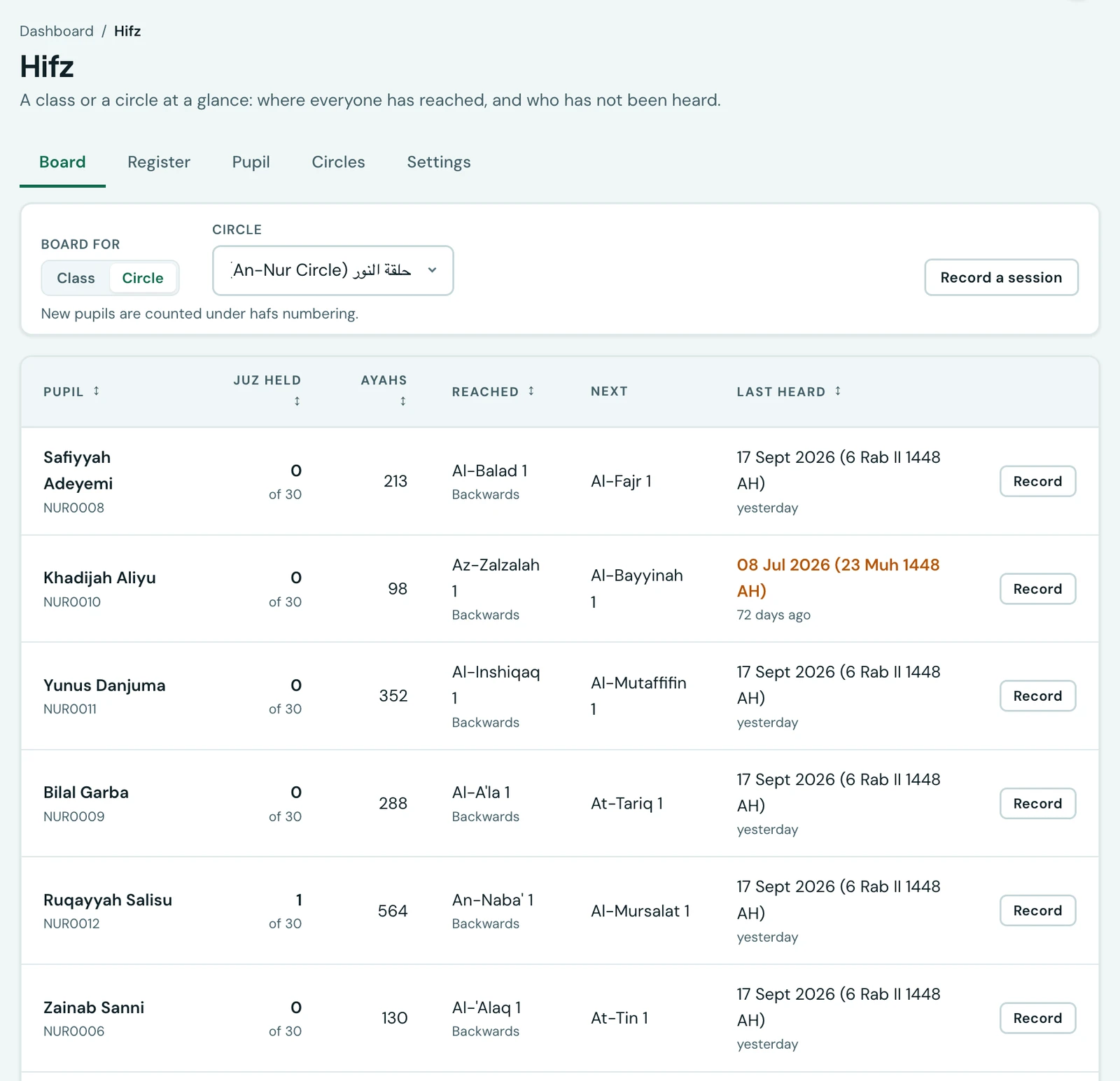
A madrasah keeps this record already, in an exercise book on the teacher's mat. It says which portion each child recited, how well, and on what day. The book works, right up until somebody asks a question of it: how much does this child actually hold, which juz are complete, who has not been heard for a fortnight. Those answers are in the book, but only in the sense that they could be worked out from it by reading every page.
This page is that book, with the questions answered.
A portion, and nothing else
A session records the portion that was recited: from one ayah to another. That is all that is stored. Every figure you read here, the ayahs memorised, the juz complete, where the pupil has reached, what comes next, is worked out from those portions when you ask for it.
Nothing is kept as a running total, so there is no figure to correct and none to go stale. Fix a portion that was typed wrongly and every number that depended on it moves with it.
You enter a portion the way you say it, by surah and ayah: Al-Mulk 1 to Al-Mulk 30. A portion may run across a surah boundary, and it may be a single ayah.
Circles, which are not classes
Pupils recite in a halaqa, a circle that sits with one teacher. A circle crosses classes: three children from الابتدائي 2 and two from الابتدائي 4 sit together because they are at the same point in the mushaf, not because they are the same age.
So a circle is its own thing here, not a class and not a timetable group. A pupil sits in one circle at a time, and moving between them keeps the record: their register goes with them.
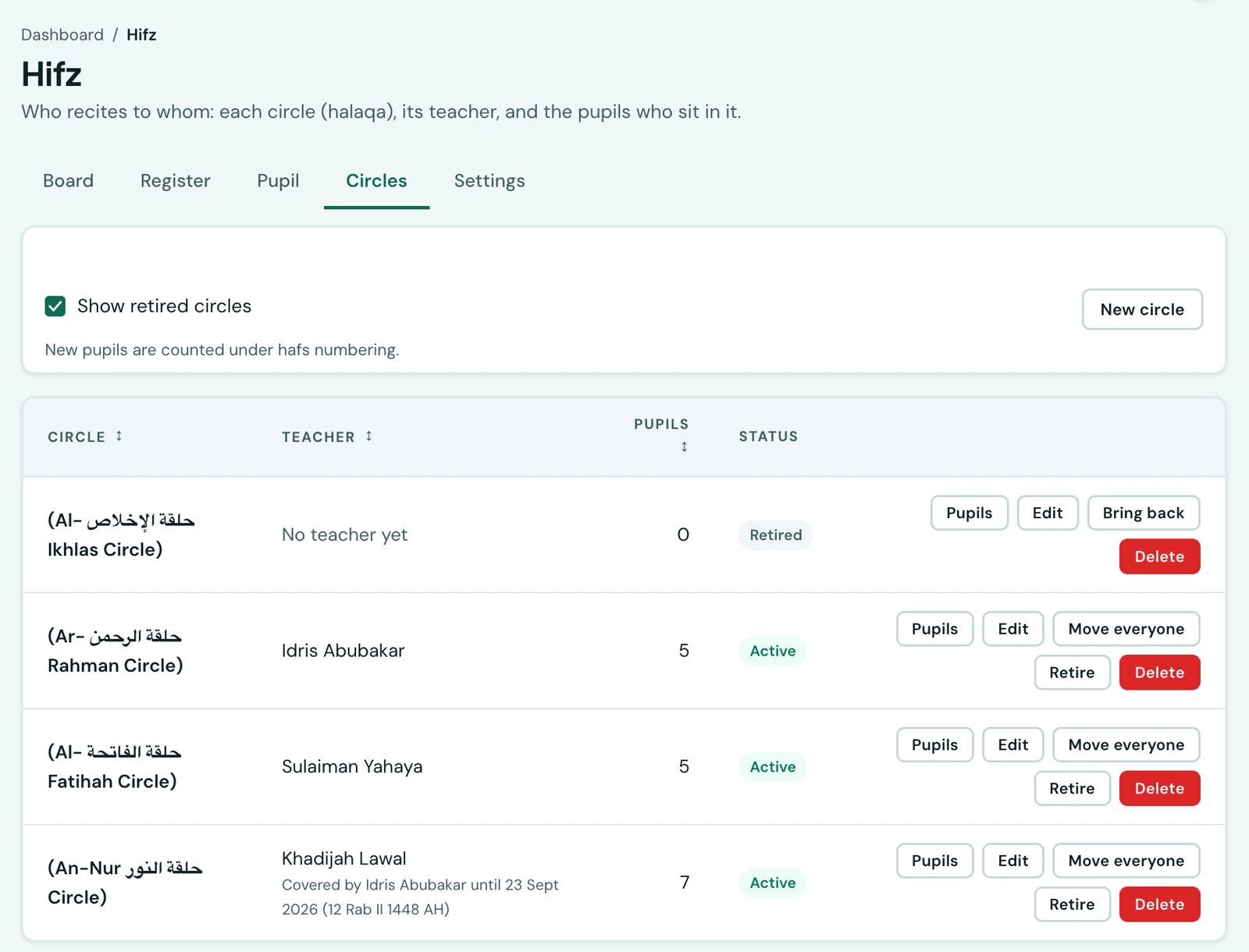
A teacher who is away is covered, and the cover ends by itself. Name a colleague and a date, and until that date they reach the circle's pupils exactly as its own teacher does. Nobody has to remember to take it off.
Retiring a circle empties it. A circle whose teacher has left is the one whose pupils most need somewhere to go, so retiring offers to move them first. The circle and its history stay, and you can bring it back.
Forwards and backwards
Most schools teach juz 30 from An-Nas towards An-Naba', surah by surah, working down the mushaf. A pupil who has finished it starts at Al-Baqarah and works up. Plenty of children do both at once, juz 'amma in the morning and Al-Baqarah in the afternoon.
Nobody is asked which way a pupil is going. It is worked out from the portion they last extended, and it follows a child who changes without anyone updating a setting.
It matters for what the page offers next. Going backwards, the next portion is the start of the surah below, not the ayah below: a pupil who has finished An-Nas takes Al-Falaq, from its first ayah. Offering them Al-Falaq 5 would be offering to recite a surah in reverse, which nobody does.
Where a pupil has reached
Two different figures, and the page prints both because schools ask for both.
Reached is the furthest point in the mushaf the pupil holds. Next is the portion to set them now. For a child working backwards these are nowhere near each other, and a page that printed only one of them would be answering the wrong question half the time.
Juz held counts only the juz they hold whole. A pupil part way through juz 29 holds none of it yet, and saying otherwise would be flattering the child rather than informing the teacher.
Revision counts, but not towards coverage
A session is one of four kinds: a baseline, something new, a revision, or a test.
Only a baseline and new memorisation add to what a pupil holds. Revision and tests are records of how well a portion is held, not of holding more of it. Counting them would make a child who revised juz 1 twenty times read as a child who has memorised twenty juz.
Starting with what they already hold
A school arriving here mid-programme does not type its history in. Record a baseline for each pupil, one portion saying what they already hold, and the register starts from there. A baseline belongs to no teacher, because nobody sat with the child for it.
Bringing a whole school's baselines in at once
Five pupils are quickly entered one at a time. Three hundred are not, so the Settings tab has a Baselines card whose Import / Export button takes a spreadsheet (CSV or XLSX) with one row per portion a pupil already holds:
- admissionNumber and fromSurah are required. A surah is its number or its name:
78,Naba,An-Nabaandالنبأare the same surah, and a misspelling is refused rather than guessed at. - fromAyah, toSurah and toAyah are optional. Leave the ayahs out for whole surahs, so a
row reading
78to114is juz 30. Write the earlier surah first, even for a pupil who memorises from An-Nas down. - date (YYYY-MM-DD) is optional and defaults to today. It cannot be in the future.
- comment is optional.
The file is checked before anything is saved, and one wrong row stops the whole file, so a register never starts from half an import. A portion the register already holds for that pupil is skipped rather than refused, so importing the same file twice adds nothing. Each baseline is counted under the pupil's own reading, as one entered by hand is, and no family is told about a juz or a surah their child held before you arrived.
Export gives the school's baselines back in the same columns, so they can be corrected in a spreadsheet and imported again. It lists only pupils on the roll, and only baselines under each pupil's current reading, since those are the ones the import can take back.
Importing needs the permission to manage the register. Exporting also needs the permission to read the whole school, because the file holds every pupil's baseline. The same button is on the Settings tab of the Hifdh screen on the phone.
The reading the numbers are counted under
Ayah numbering differs between readings, so a portion recorded under one reading names different ayahs under another. Your school sets a default, and a pupil may be counted under their own, because one madrasah teaches Hafs and Warsh at once.
A record written under a reading other than the pupil's is set aside from their figures rather than folded into them, and the page says how many have been. Hafs an Asim is the reading available today.
Who may read and record
A teacher reaches a pupil in a circle they lead or are covering, and, failing that, in a class they take. The circle comes first deliberately: it is how a madrasah is actually organised, and a school that has not built its circles yet keeps recording on the class rule underneath.
Reading the whole school, managing circles and running the reports are each their own permission, set on the Roles page like everything else.
What a teacher does on a handset
The whole register is on the phone, which is where it will actually be used: a teacher sits with a circle and records against the pupil in front of them. The form opens already filled in with the portion that comes next, so an ordinary session is a rating and one tap.
Telling the family
A family is not told about every session. A teacher records two or three a week for each child, and a message for each of them would soon go unread. What a family hears about is a milestone: their child finishing a surah, finishing a juz, or completing the whole mushaf.
It arrives in the app and as a push notification on their phone, naming the child and what they finished: "Aisha Bello has finished memorising juz 30 and Surah An-Naba'". One session that finishes both is one message, not two, and it names the larger milestone first. Email is available and off to begin with, because a congratulation belongs on the phone rather than in an inbox. You choose the channels under Settings, Communication, as for every other notice. Milestones are not sent over WhatsApp yet.
Each milestone is announced once. A child revising juz 3 every week still holds juz 3 every week, and their family is told the first time and never again.
A correction takes a milestone back. If a session entered against the wrong child, or with the wrong ayahs, completed a surah the pupil does not really hold, deleting or correcting it withdraws that milestone, so the family is told again on the day the pupil genuinely finishes it.
Nothing is announced for what a pupil held before. A baseline you record for a pupil who already holds juz 30 says where they were when you started; it does not send their family a message for every surah they learned years ago. The same goes for everything recorded before milestones existed.
On the report card
A Hifdh section on the report card prints what the pupil gained this term, how much they hold altogether, the juz they have completed, where they have reached and which way they are working, how many sessions they sat, and the teacher's own words from the last session of the term that had any. The juz are listed in ranges, such as "1 to 3, 29, 30", so a pupil who holds the whole Qur'an reads "1 to 30".
What moved this term leads, because it is what a parent reads the card for, and nothing else on the card answers it. It counts only new memorisation: a term spent revising ground already held adds nothing to it.
The figures stop moving once the term is over. Until the term's last day the section follows the register, counting only sessions up to the end of term, so a card saved early for its remarks still shows the whole term when it is printed. The first time a card is saved or generated after the term has ended, the section is fixed as it stands, so a card printed in December and reprinted in March still says what it said in December. If the term has no dates in your calendar, the section is fixed whenever the card is saved, and the "this term" figure is left out because there is no term to measure.
The section appears in the Report Card Designer like any other, and you can move it, rename its heading, or leave out the term figure, the position or the remark. A school that does not keep a register sees nothing new on its cards.
What the family sees
Parents see a Qur'an Memorisation card on their dashboard, naming where each of their children has reached, which juz they hold and which way they are working, with their latest sessions underneath: the portion, how it went in your own rating words, who heard it, and the teacher's comment. A session is there as soon as it is recorded, because it is a note of what happened rather than a judgement waiting to be released.
Pupils have the same card on their own dashboard, which is also where a milestone message takes a pupil who has no parent on the system. Both cards are on the phone as well as the web.
A parent with one child at your madrasah and another at a school with no register sees the card for the first only; a family with no child in a register never sees it at all, and it is not offered to them when they customise their dashboard. On the teacher's dashboard, Hifdh This Week lists the sessions recorded for their pupils over the last seven days.
Switching it off
The register is an optional module. A school on a madrasah curriculum has it from the day it registers, and any other school can be given it. Switching it off takes it out of every menu and refuses it to anyone with the address. Nothing is deleted, and switching it back on returns every record.
On the phone
The whole register is on the mobile app, under More → Hifdh, in four tabs: Register, Board, Circles and Settings, each shown only to somebody holding its permission. The web's Pupil tab is not a tab on the phone: tap a pupil's row on the Board to open their figures, where they have reached and their next portion.
On the Register tab, Record a session opens the form already filled in with the portion that comes next, so an ordinary session is a rating and a save. Circles sets up, edits, covers, moves and retires circles as on the web. Settings carries the register's settings and the Import / Export button for baselines.
Ready to try it with your school?
Three-month Basic trial. No card required to register.