
Communication
Automated Parent Notifications
Automatically alert parents about invoices, cancellations, receipts, refunds, overdue fees, exam timetables, weekly digests and absences, by email, WhatsApp, app push or any combination you choose.
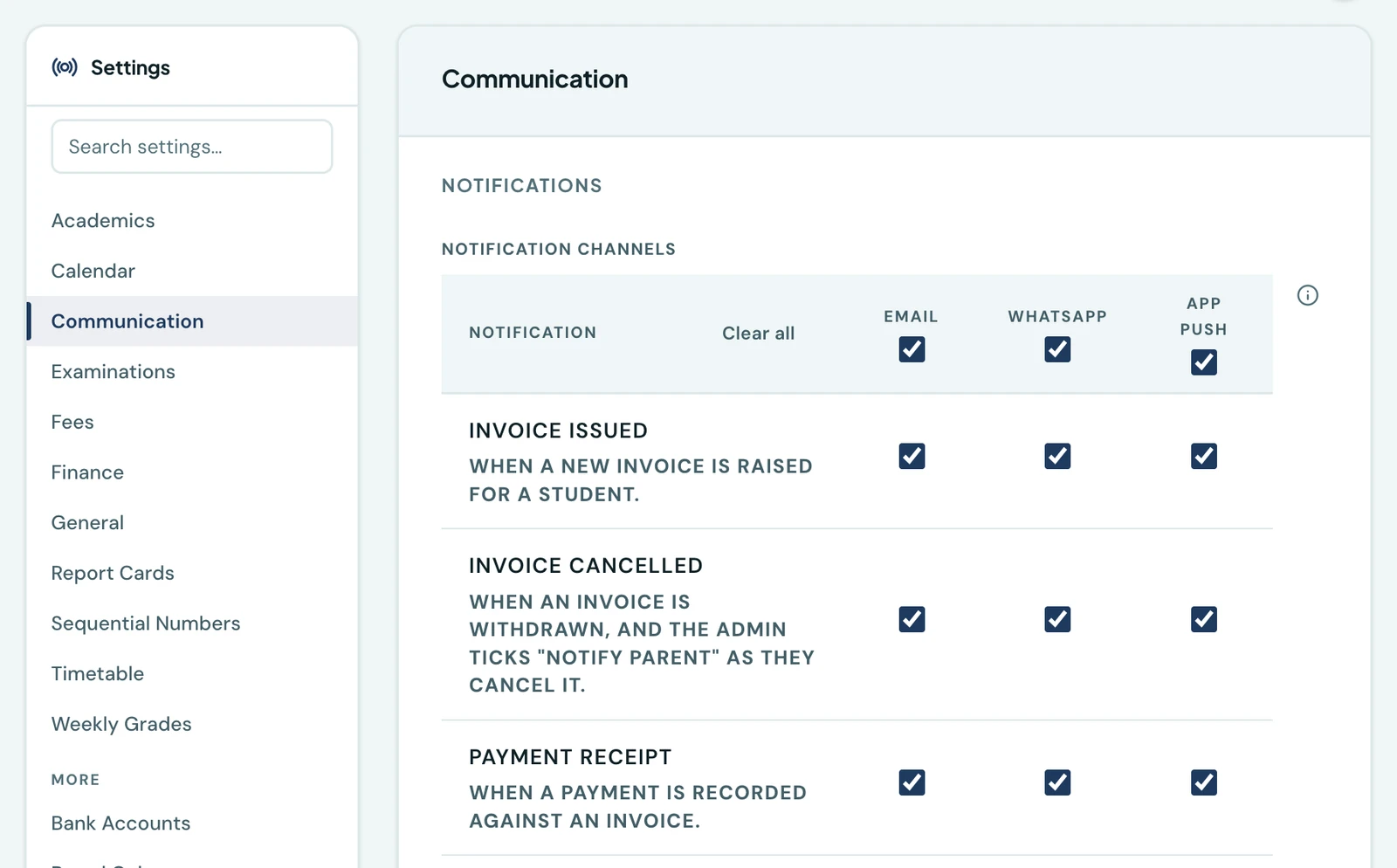
Beyond bulk messaging and the weekly digest, 1410SMS automatically notifies parents about key events. You decide which events notify parents and over which channels, whether that is email, WhatsApp, app push or any combination, under Settings → Communication → Notification Channels.
What can be sent automatically
- Invoice issued. When a new invoice is raised for a student
- Invoice cancelled. When a charge is withdrawn, and whoever cancels it ticks notify parent
- Payment receipt. When a payment is recorded
- Refund issued. When money is refunded to a family, unless whoever records it turns the notice off
- Fee reminder. Automatic overdue notices at configurable day tiers (7, 14, and 21 days past due by default), which you can also hold in a queue and release yourself. See Fee reminders
- Exam timetable. When an exam timetable is published to a class
- Weekly digest. A weekly summary of each child's attendance, homework, weekly marks, and fees. A child with nothing owing because the school has not invoiced them for the term yet reads "No invoice has been issued for this term yet", not "All fees are up to date"
- Attendance. When a student is marked absent, over every channel you tick. Every other mark (present, late or excused) is sent in the app and by push only, whatever else is ticked, since it goes out every school day. Only today's register sends it, so catching up an earlier day's register announces nothing but its absences. Marking the same status again sends nothing, changing it sends a fresh notice, and a CSV import of past registers is never announced
- Weekly grades published. When an academic week's marks are released to a class. See Weekly grades
- Homework. When work is set for a class, when a pupil's work is marked, and the evening reminder of what is due tomorrow. See Homework
- Class resources. When a teacher shares material with a class: its pupils and their parents are told. See Class resources
- Hifdh milestone. When a pupil completes a surah, a juz, or the whole mushaf. See Hifdh
- Calendar reminder. An evening reminder, a day or two ahead, of the events and school closures coming up. See Family Calendar
- Event cancelled. When you call off an event and choose to tell families, in the app, by push and by email
- Report cards released. One notice to every family when you release a term's report cards, on the channels you tick for results. It says the cards are out and nothing about what is on them. See Publishing report cards
Where a channel is not offered
A tick box the platform does not act on is greyed out, with the reason beside the matrix. Today that is six boxes: homework, class resources, corrected results, hifdh milestones, calendar reminders and the weekly digest are not sent over WhatsApp. Families are told in the app, by push and (unless you untick it) by email instead.
Homework is withheld because of how often it goes out. One secondary school setting work on a Monday evening is a message to every pupil and every parent in it, several times a week. That is more traffic than every other notice on this page put together, and it would spend an allowance your fee reminders depend on. Class resources are withheld for the same reason: each worksheet or past paper a teacher shares goes to every pupil in the class and their parents.
Weekly grades can go over WhatsApp, but only if you tick it. Its box starts empty. A week of marks goes to every family in the class up to fifteen times a term, against three or four fee notices in the same period, so ticking it makes it far the largest line on your allowance. The message names the child, the week and the class, never the marks, and links to them. On the mobile app, the box can be ticked from version 1.9.8.
A calendar reminder goes to every family in the school on the same evening, so a single closure would spend a whole day's allowance at once, ahead of the invoices and receipts queued behind it.
The weekly digest is one message per child, every week, to every family you have. A parent with three children is three messages each Sunday, and the school's whole roll is a larger send than any other on this page repeated week after week. It is also the message that carries least on WhatsApp: the template names the week rather than the week's figures, so it can only say "read your email", which is where the digest itself has already gone. Families get it by email and in the notification bell.
The digest is not sent as an app push either. A Sunday-evening summary is not something to buzz a phone for, and the notification bell already holds it. Its App push box is greyed out for the same reason as WhatsApp: a box nothing acts on tells you families were pushed when they were not.
The point of greying it out rather than accepting it is that a preference nothing acts on is worse than one that is missing: it tells you the family was messaged.
It is shown greyed out rather than hidden, on the web and on the phone alike, so an admin looking for WhatsApp finds it and reads why instead of concluding one of the two apps offers less than the other.
Weekly digest & opt-out
Every Sunday evening, each parent receives a single weekly digest summarising every linked child's attendance, homework, the week's weekly marks where the class has published them, and fee position. Its opening line names the week it reports, for example "Week 3 (28 September to 2 October)", where your Academic Calendar has the term's dates. The dates run from the week's first school day to its last, so a Monday-to-Friday school's week reads Monday to Friday.
Attendance is the week's first, then the term's, for example "Present 4 of 5 days this week (1 late) · 96% this term". The digest is about the week just ended, so that is the figure it leads with. The term rate follows because one week is only five days: a single absence reads as 80%, and the term rate tells a family whether that is unusual. A late arrival counts as present and an excused day does not, as everywhere else on the platform. A week with no register marked says so rather than showing the term's figure as the week's.
A school day with no register record for the child is counted and named, for example "Present 3 of 4 school days this week (1 day not recorded)". This is usually a class register nobody marked that day, and the digest shows it so the week's figure does not quietly shrink. Holidays in your Academic Calendar are not school days, so they are never counted as missing.
It carries no term marks: those belong to the report card, and a list of the latest released marks would repeat unchanged every Sunday until the next release. Parents who'd rather not receive it can turn it off themselves under Settings → Notifications in their portal, so an admin never has to manage this per parent. A student with no digest-eligible parent (none linked, or their only parents have opted out) still gets a one-child digest of their own, addressed to the guardian contact on file, or to the student directly if there is not one. Nobody falls through the gap. The digest honours the same school-wide toggle as the other notifications.
The digest also lands in the notification bell, so a parent who deleted the email, or who has no email address on file at all, can still find it. The bell entry names the children it covers and opens straight onto that child's page, or the dashboard listing them where there is more than one. It is a signpost rather than a second copy of the summary: the figures stay in the digest itself.
Nothing goes out over a break. Before sending, the digest checks your Academic Calendar for the week just ended, and a week with no teaching day in it produces no digest at all. Every figure in one of those would be last week's: no register was marked, no grade entered, and the fee position is unchanged. Parents who receive four identical summaries over a holiday stop opening the one that follows it. A single teaching day in the week is enough for the digest to send as normal.
Its links go where the email was about. A parent with one child at your school lands on that child's page; a parent with several lands on their dashboard, and each child's section in the email carries its own link. Nobody is dropped on a front page and left to find their way back to what they have just read. Signing in is not skipped, only remembered: a parent who is already signed in goes straight there, and one who is not is taken there once they have.
Homework in the digest
Each child's homework follows their attendance, in up to three parts, and the whole section is left out for a child with no homework either way:
- A summary of the week, for example "Submitted 3 of 4 due this week (1 late) · 1 not recorded yet".
- This week's work, each piece with how it went. Anything still owed or not on record comes first. Work a teacher marked during the week appears here with its mark even if it was due earlier, for example "Submitted · 17/20". The teacher's written comments are not copied into the email; the family reads those on the homework page.
- What is due this coming week, soonest first, leaving out anything the child has already handed in. Sunday evening is when a family plans the week ahead, so this is the part they act on. Reading and revision with nothing to hand in is listed and marked "(nothing to hand in)". Online work and tests show the time they close; work in an exercise book shows only the day.
Exercise-book work is never called late or missing. When a teacher ticks a book, the platform records the moment of the tick, not the moment the book was handed in, so a book ticked on Friday for Thursday's work would otherwise read as late. Until the teacher has ticked anybody for a piece of work, an unticked book reads "Not recorded yet" and is not counted. Once they have ticked some of the class, it reads "Not recorded as submitted". Neither wording blames the child for a record the school has not finished, and the summary is never coloured as an alarm.
Lateness is shown only for work a pupil handed in online themselves. A test the child has finished reads "Taken", with its score once you have released the results. Work given out before a child joined the school is never counted as missed. Each list shows at most eight pieces of work behind and six ahead, then says how many more are on the child's homework page.
The homework in the digest follows the parent's digest switch, not their choices for individual homework notices: a parent who has turned off the evening reminder still sees the week's homework here, as they do the week's weekly marks.
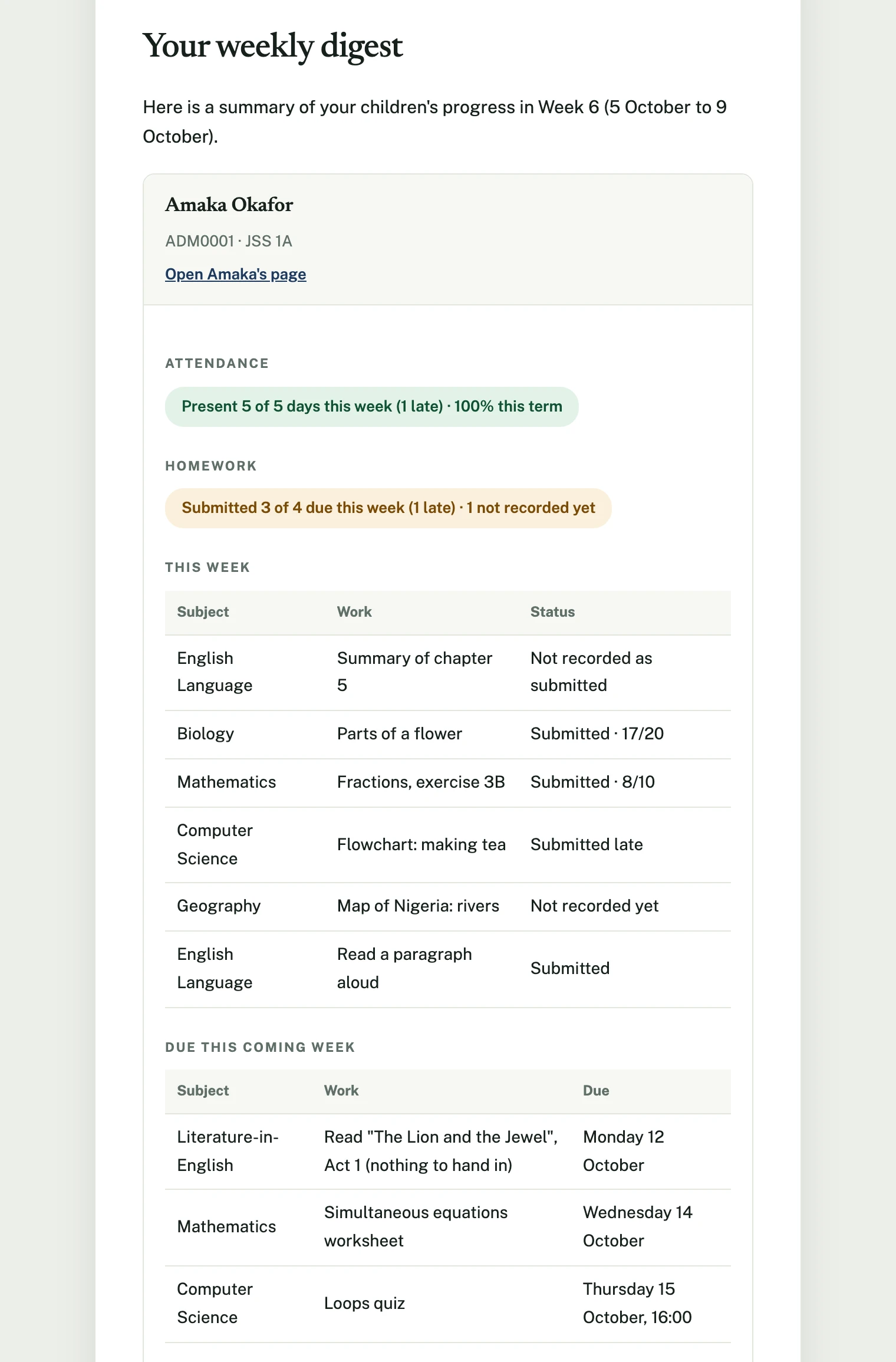
One child's homework in the weekly digest: the week behind, with how each piece went, and the week ahead.
Choosing channels
Each notification type has an Email, WhatsApp and App push tick box. Tick any combination, or none at all to turn that notification off entirely. Most notifications default to all three, since every plan, including Free, includes a WhatsApp allowance. The exceptions are the six above: homework, class resources, corrected results and calendar reminder start on email and app push, the weekly digest on email and the app alone, and hifdh milestone on app push alone, because their WhatsApp boxes are not offered at all. Weekly grades published also starts on email and app push: its WhatsApp box is offered but starts empty.
A correction is its own row, not a share of the thing it corrects. Cancelling an invoice and refunding a payment are separate lines from Invoice issued and Payment receipt, so a school that settles refunds with a call from the bursary can silence the refund notice without silencing its receipts. Whether a family is told at all is still decided per action as you cancel or refund, this decides how they are told when you say yes.
The in-app notification centre is not one of the tick boxes: it is always on, because it costs nothing to deliver and never leaves the platform. Turning off every channel above stops the emails, the WhatsApp messages and the push notifications; the event still appears in the bell.
Parents can narrow these for themselves
What you tick here is the most any family is sent. Each parent can then choose, under their own Settings → Notifications, which of your channels carry each kind of notice: fees to whoever pays them, learning updates to whoever follows the schoolwork. They can never add a channel you have not ticked. See Choosing how you are told for what a parent sees.
The notices that matter cannot be turned off. Absences, fees, your messages, calendar and closures, results and changes to a published exam all reach every parent: a parent picks the channels but must keep one that actually reaches them. Only learning updates (weekly marks, homework, class resources and hifdh milestones), exam timetables and the daily present, late and excused marks can be switched off. You cannot override a parent's choice, and do not need to: an urgent message is one of your messages, so it always reaches them.
Your records say why. A message a parent's choice kept off a channel is listed in the send's breakdown as Not sent on this channel: the parent's choice, beside the channel it did go on, rather than leaving a gap to explain. A parent's record on the Parents page has a How they're reached panel showing how each kind of notice reaches them at your school.
A parent who replies STOP on WhatsApp gets no more WhatsApp messages, from any school, and the breakdown says this number replied STOP. Their mandatory notices go by email or the app instead. Only the parent can restart it, by replying START or from their own settings. Nothing is charged to your allowance for a message that was not sent.
Bulk email carries an unsubscribe link. Your school messages and the weekly digest carry one, both in the footer and as the one-click button mail apps show. Invoices, receipts and other transactional emails do not. A parent who unsubscribes has school messages moved off email only where the app or WhatsApp reaches them, since school messages cannot be turned off. A guardian with no account is simply not emailed again, and the breakdown says this address unsubscribed.
App notifications never carry a figure. A fee notification shows no amount, a marked homework notification no mark, and an attendance notification reads "Attendance notice for Ada" without the mark: a shared family phone's lock screen is read by the child too. The details are one tap away.
Confirming WhatsApp consent
WhatsApp requires every business to be able to show that the people it messages agreed to it. An administrator confirms once, at the top of the notification channel settings, that parents and guardians have agreed to receive WhatsApp messages from the school, however your school asked them. The confirmation covers the whole school and is recorded with who made it and when.
- Switching WhatsApp on for a notice that was off needs the confirmation first.
- A parent who chooses WhatsApp in their own settings, or replies START, is recorded as having agreed themselves. A parent's How they're reached panel shows which applies.
In-app notification centre
A notification bell in every portal (staff, student and parent) opens an in-app notification centre with an unread count, mark as read, mark all as read and archive. Nothing there depends on an email or a WhatsApp message actually landing. It is populated by the same events as the other channels and works the same way on web and mobile.
On the phone
Settings → Notifications in the mobile app carries the same list of notifications as the web matrix, one row each with an Email, WhatsApp and App push chip, saved in one press. It is the same setting, so a change made on either shows up on the other.
A parent's own record of what the school has told them is More → Messaging in the app, listed newest first: bulk announcements alongside every automated notice, so an invoice, a receipt, an attendance alert, a published exam timetable, a weekly digest and a letter from the office are one feed rather than several.
An announcement appears once, whatever it was sent on. A message sent by both email and WhatsApp is one entry here, not two, because which pipe it came down is the school's business and not the reader's. Where a school can see the per-channel breakdown of a send is its own Messaging history.
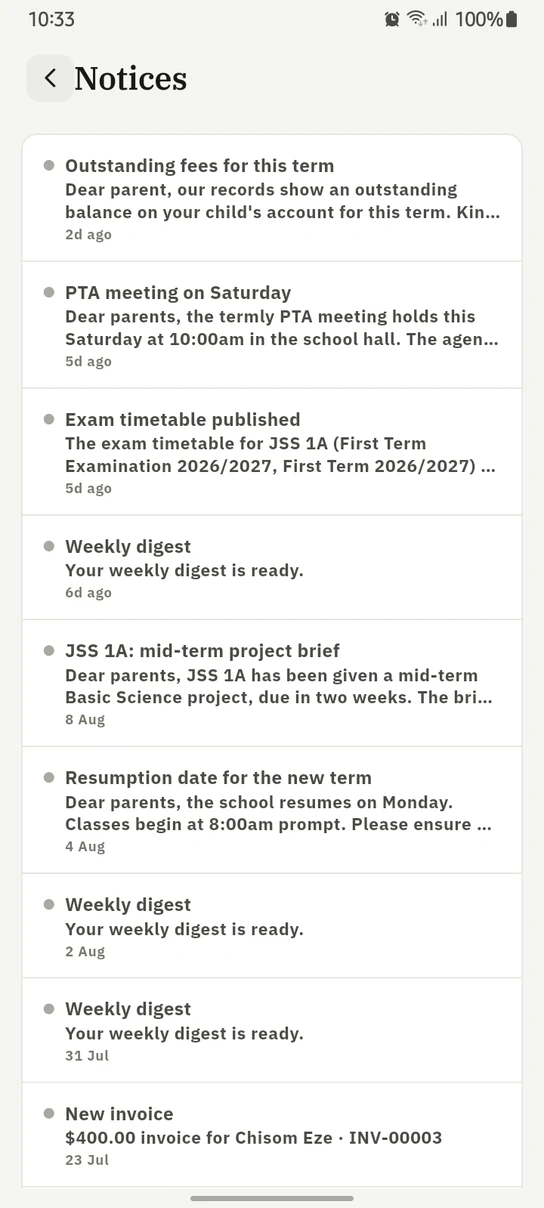
A parent's Notices feed: announcements and automated notices in one list, newest first.
Ready to try it with your school?
Three-month Basic trial. No card required to register.