
Students
A Student's Invoices and Payments
Every invoice raised against one student and every receipt recorded for them, on the student's own record, each downloadable as a PDF or a CSV.
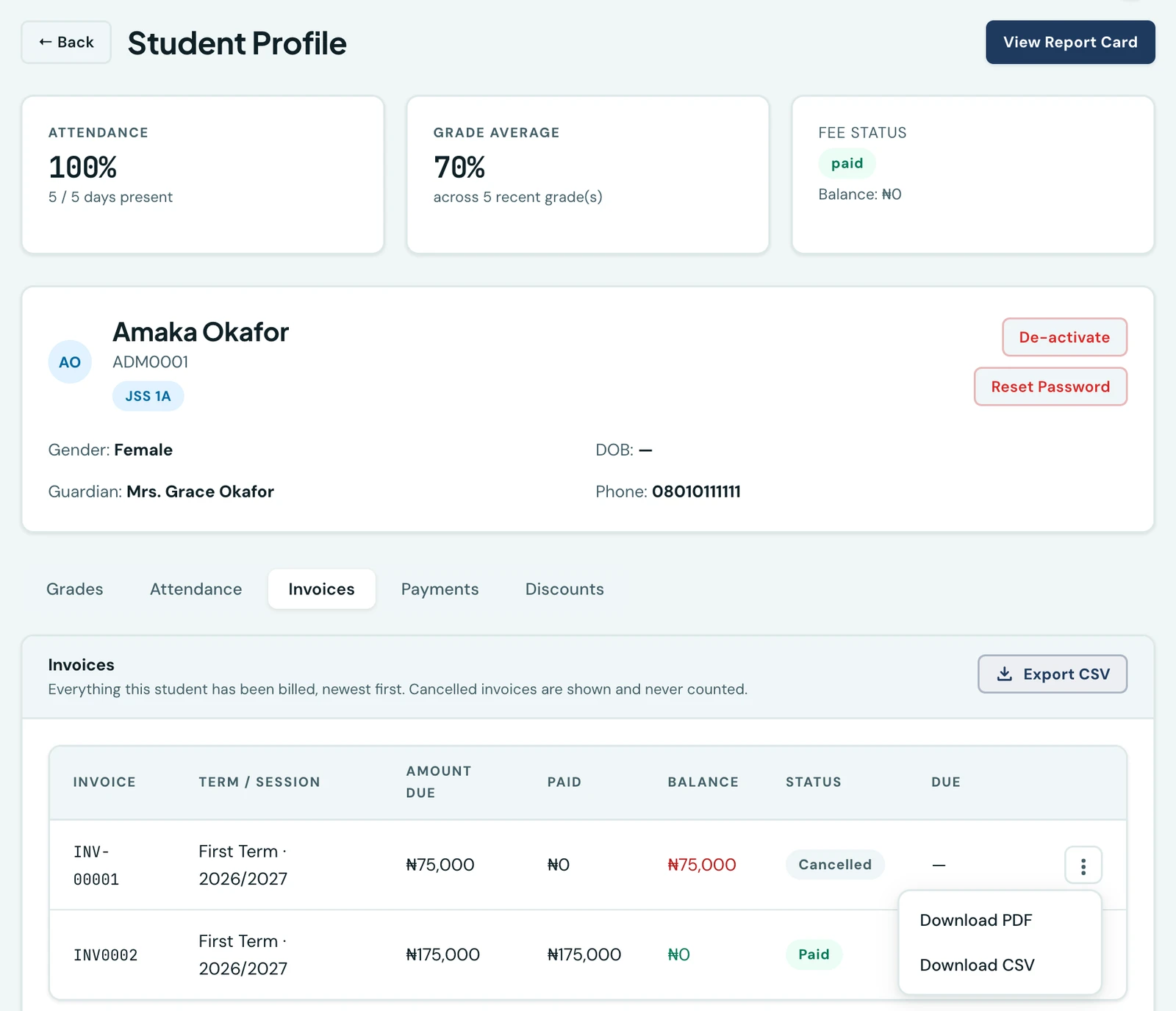
A school is asked about one family far more often than about the whole ledger. Invoices and Payments are two tabs on a student's own profile, so the answer is on the record you already have open rather than in a filtered search of the Finance workspace.
What each tab shows
- Invoices. Every invoice raised against this student, newest first, with the amount due, what has been paid against it, the balance, its status and its due date. Cancelled invoices are shown and never counted.
- Payments. Every receipt recorded for this student, newest first, with the invoice it settled, the amount, the method, the date and its review status. A voided receipt is shown rather than hidden: it is part of what happened on the account.
Both tabs read the same figures the Finance workspace reads, narrowed to one student on the server, so they cannot disagree with the Invoices and Payments lists there.
Downloading
Each row offers two documents from its ⋮ menu:
- Download PDF on the Invoices tab, and Download receipt (PDF) on the Payments tab. The invoice or receipt exactly as the family received it, on your school's branding.
- Download CSV. That one record as a spreadsheet row.
Export CSV above the table downloads every invoice or payment for that student, not just the page on screen. Both need the finance export permission; the PDF needs only finance access.
Filtering the Finance workspace to one student
The same narrowing is available the other way round. The Filter drawer on the Finance workspace's Invoices and Payments tabs now carries a Student field, searched as you type, so a question about one child can be answered from the list you are already on. It can be saved into a named filter set like any other field.
On the phone
Open a student, then Invoices & payments (also in the ⋮ menu). The same two tabs, the same two downloads on each row, and the same whole-list export, handed to the phone's share sheet so the file can go to a spreadsheet app, an email draft or the school's drive.
Who can see any of it
The two tabs are gated separately, on the same two permissions the Finance workspace's own Invoices and Payments lists use: View invoices and View payments. A member of staff who holds one sees that tab and not the other; one who holds neither sees no finance tabs at all, and is not offered the phone's Invoices & payments entry. On the phone the screen names itself after whichever list the reader can actually see. See roles and permissions.
The fee status on the summary at the top of the profile follows the third finance permission, View finance (a status is a summary rather than the ledger). It is withheld by the server rather than hidden by the page, so a class teacher who may legitimately open a pupil's record to check attendance and marks is not sent that family's balance at all. They keep the rest of the summary; the fee card is simply not there.
Ready to try it with your school?
Three-month Basic trial. No card required to register.