
Academics
Homework
A teacher sets work with a date it is due, once for every class that gets it, and the pupil and their parents see it that moment. Paper homework works exactly the same way, which is the point.
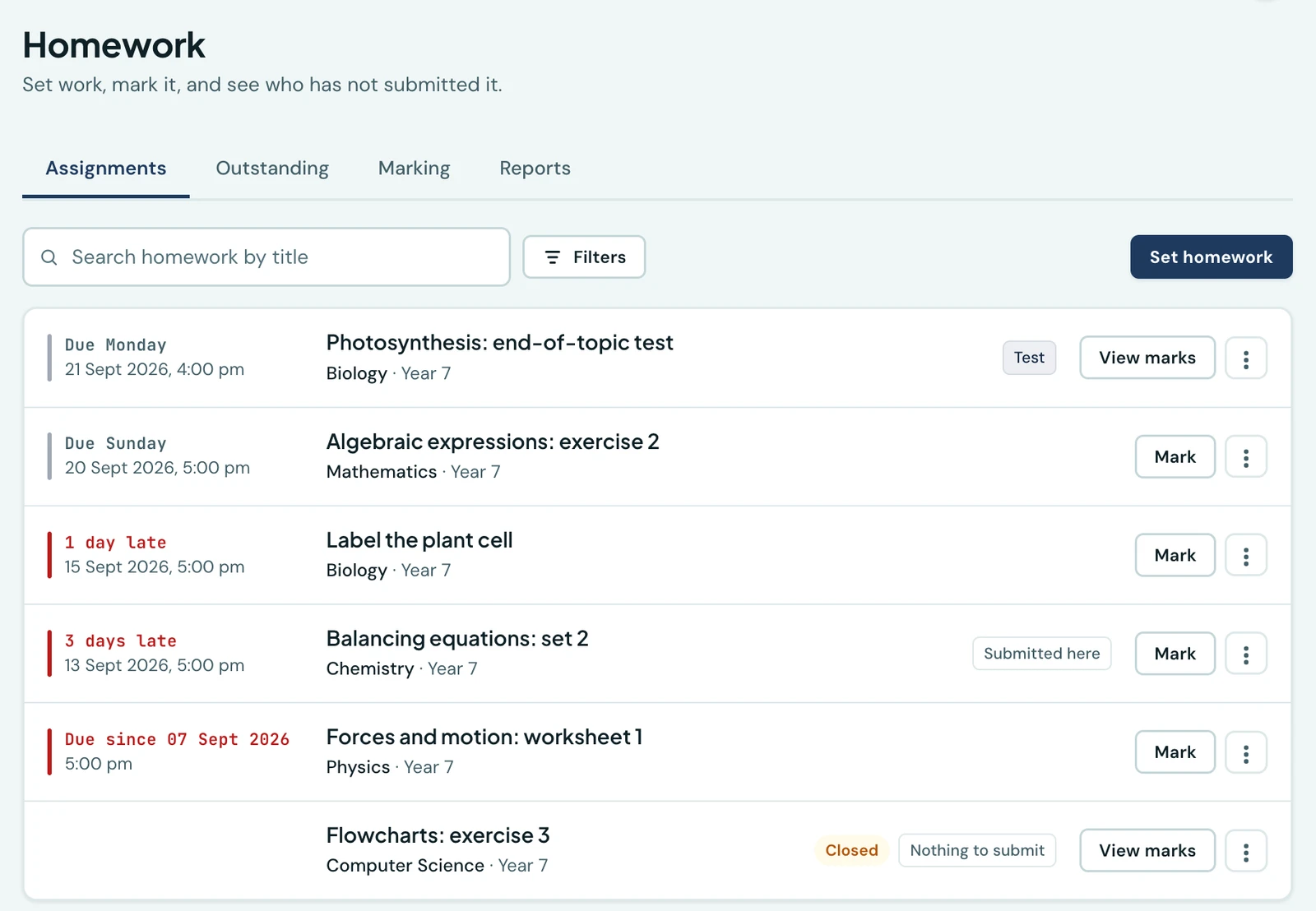
Every school already sets homework. What no school has is an answer to the question that follows on Thursday morning: which twenty-three of these hundred and twenty pupils have not submitted anything. That list gets compiled today by walking round a classroom, and it gets compiled again from scratch the following week.
This page is the first half of that: what was set, who it went to, and by when. The second half, ticking a class off and the outstanding list itself, is Marking and the outstanding board.
Setting homework
Homework is its own entry in the sidebar and its own screen on the phone. A teacher sets a piece of work once and chooses the classes it goes to, so a Maths teacher taking JSS 1A, 1B and 1C types it in once and all three classes get it. Each class sees it as their own.
What a piece of homework carries:
- A title and what to do. The title is what everybody sees first; the instructions are in your own words and are read by the pupil and their parents.
- A deadline with a time on it. Not just a day. "Due Friday" and "due Friday at four" are not the same instruction, and midnight at the start of Friday is nobody's idea of the first one, so the field opens on four in the afternoon and you change it if you mean something else.
- A worksheet, if there is one. Attach the question sheet, a photograph of the textbook page, a PDF past paper. Everyone the work was set to can open it, and so can their parents.
- What it is marked out of, or nothing at all for work you tick rather than score. Most homework is ticked, and the platform does not make you invent a mark out of ten.
Paper homework is the ordinary case
Most homework in a school like yours is written in an exercise book and handed to the teacher on the day. Nothing here assumes otherwise. A piece of work is either submitted as a book, which is the default, or nothing is submitted at all, which is what reading and revision are.
That matters because it means the whole thing works at a school with no pupil devices whatsoever. The teacher ticks who submitted, and everybody who did not is the list.
The term it counts in, and the deadline, are two different things
The term a piece of work belongs to is set when you set the work, and it starts on the term your school is currently in. You can change it.
This exists for one case, and it is a case every school has: the holiday assignment. Given out in the last week of first term, due the second day of second term, and thought of by everybody at the school as first term's homework. If the platform worked the term out from the deadline it would file that piece of work under second term, or under nothing at all, since its deadline falls in the holiday and a holiday is in no term.
So the deadline does one job only: it is what "late" is measured against.
Late work
Late work is accepted unless you say otherwise, per piece of work, and your school sets which way that switch starts. Work a pupil hands in late through the platform is always shown as late. An exercise book you tick is not shown to the family as late, because the platform knows when you ticked it, not when it was handed in.
The reason it defaults to accepting is worth saying plainly: refusing a late submission does not produce a punctual pupil. It produces a pupil who submits nothing at all and a teacher who has lost the work. There is no automatic penalty either: a percentage knocked off per day is a policy that differs by school and by subject, and a mark you did not choose is one you cannot explain to a parent.
Draft, set, closed
A piece of work is a draft while you are writing it, and nobody outside your own screen can see it. Setting it is what makes it visible to the class and their families. Closing it stops it taking anything in without hiding it: the pupils who did it still have it in their history. Once it is closed, the deadline stops counting: the homework list stops showing the deadline (the row already says Closed), the marking screen says the work is closed and shows when it was due, and a pupil or parent sees Submitted if the work came in and Not submitted if it did not. Closed work that never asked for anything to be submitted just reads Closed.
Overdue homework closes itself. Work still open 14 days after its deadline is closed overnight, so nobody has to close each piece by hand and the outstanding list only counts work someone is still chasing. Late work is accepted until then, unless the teacher refused it on that piece. Your school can change the number of days, or turn this off, under Settings → Homework. Families are not told when work closes. If you give closed work out again, or change a piece of work that is overdue, it stays open for the full number of days again before it can close.
Deleting is for a mistake. Once anything has been submitted, closing is what you get instead, so that nobody's marks disappear because a piece of work was tidied away.
What a family sees
The pupil and their parents see everything that has been set for them: what it is, what has to be done, when it is due, and whether the deadline has gone. Anything the teacher attached is theirs to open.
They see it the moment the work is set, in the app, by email and as a notification on the phone, following your school's own notification settings. Homework is not sent over WhatsApp, and that is deliberate: it is by far the most frequent thing this platform would ever tell a family, and it would exhaust the messaging allowance that fee reminders and receipts depend on.
They also keep it. A homework mark never appears on a report card, so the record itself is what a family gets: every piece of work set for that pupil, for as long as they are at the school, and once it has been marked, what it got and what the teacher said.
Who can do what
| Permission | What it allows |
|---|---|
| View homework | Read the homework you set |
| Set and mark homework | Set it, edit it, close it and mark it, for the subjects you are assigned in a class or the class you are class teacher of |
| View homework school-wide | Read every teacher's, not only your own |
| View the outstanding board | See who across the school has not submitted |
A teacher can set homework for a class they take as homeroom teacher, or a subject they teach. It is deliberately either, not both: plenty of schools never build a timetable, and a rule that needed one would leave those schools unable to set homework at all.
On the phone
The whole of the above is on the phone. A teacher sets work and edits it there; a pupil opens Homework and reads what is due; a parent opens a child and reads theirs. Attachments open from the phone like any other file.
Related pages
- Submitting homework online. Photographs of an exercise book, typed answers and files, for the schools whose pupils have a handset.
- Homework reminders. One message a day naming everything a pupil has due, never one per piece of work.
Ready to try it with your school?
Three-month Basic trial. No card required to register.