
Academics
Checking an Exam Before You Publish
Every problem with an exam timetable, named at once before it goes out: clashes, papers on closed days, unstaffed rooms. And when a paper moves afterwards, the families sitting it are told.
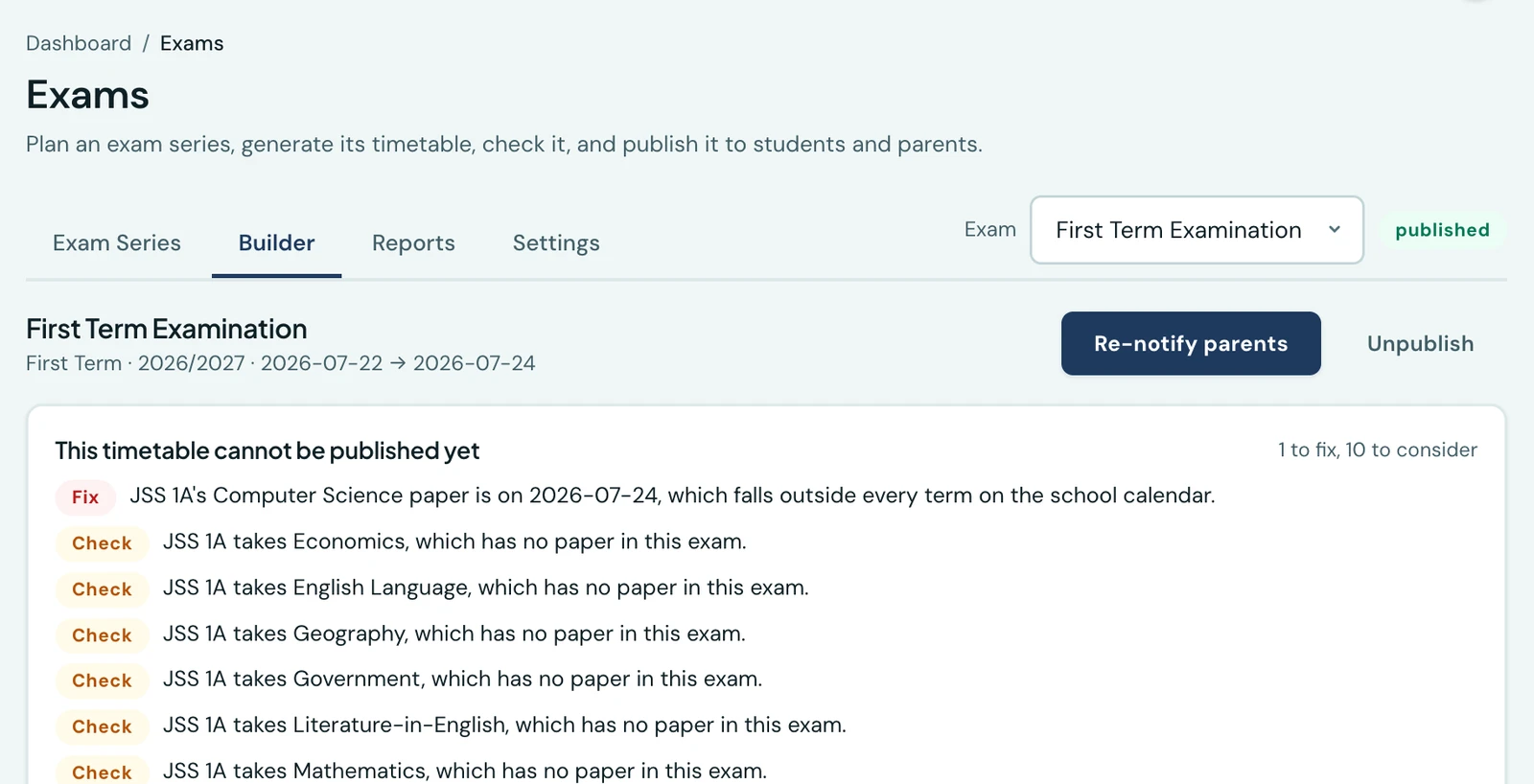
An exam timetable is published once and read by every family in the school. Up to now the only checking happened paper by paper, as each was saved: a clash with the papers that existed at that moment. Nothing ever looked at the finished thing.
The check runs before you publish, and lists everything at once. Fixing one problem to be shown the next is a page you have to find again each time.
What stops a publish
- A class sitting two papers at once. Nobody can be in two rooms.
- An invigilator in two rooms at once, across any classes.
- A paper on a day the calendar says the school is closed. A family reading the timetable will bring their child to a locked gate. A school opening specially says so on its calendar.
- A paper on a date no term covers at all. Told apart from a closed day on purpose, because it is almost always a year typed wrongly, and looking through the holiday list for it finds nothing.
- A paper outside the exam's own start and end dates.
What is only worth a look
These are printed and publishing goes ahead, because each of them can be a deliberate choice:
- A room with more pupils in it than it holds, and only where a capacity was actually entered. A hall taking a whole year group is the ordinary arrangement, so this advises rather than refuses.
- A subject the class takes with no paper in the exam. Schools examine some subjects and not others; this is the one worth saying, because a subject nobody scheduled is invisible on a timetable and gets discovered by the class that turns up for it.
- A class sitting more papers in one day than your limit allows. The limit is your own setting.
- A paper with no invigilator.
You can see the same list at any time on the exam's page, so a series can be tidied up long before anyone means to publish it.
Publishing is its own permission
Building an exam timetable and sending it to every family are different acts. Publish exams is now separate from Manage exams, so a school can let an exams officer build the series while whoever answers for it decides when it goes out. Every role that could publish before still can: nobody loses a button they had yesterday.
When a paper moves, the class is told
Publishing used to be the only thing an exam announced. If a paper was rescheduled or cancelled afterwards, nobody heard. That is worse than never publishing, because every family is holding a document that is now wrong.
Move a paper in a published exam, or remove one, and the families of that class get a notice in the app and on their phone. It names both the slot it was in and the slot it is in now, so it can be checked against the timetable already on the fridge. A cancelled paper names the morning it was going to be, which is the fact a parent actually needs.
Three things it deliberately does not do:
- Nothing is sent while the exam is still a draft. Arranging papers nobody has seen is not an announcement.
- Only a move counts. Changing a room or an invigilator does not alter where anyone has to be, and a notice about it would teach people to swipe these away.
- Only the class sitting the paper is told, not the school.
On the phone
The mobile app runs the same check before anything goes out. Open More → Exams, tap a series, and from the menu at the top right choose Check this series. It lists every finding at once, what must be fixed above what is only worth a look, from the same check that refuses a publish.
Publish is in the same menu, for someone who holds Publish exams. It checks the series first: if something must be fixed, the findings open instead of the confirmation, and if only warnings remain, the confirmation names them. Moving or removing a paper in a published series from the phone tells that class's families exactly as it does from the web, with nothing for you to send.
Ready to try it with your school?
Three-month Basic trial. No card required to register.