
Getting Started
How to Register Your School
Register your school in minutes with one short form, an email verification and a portal provisioned on your own sub-domain. No credit card required.
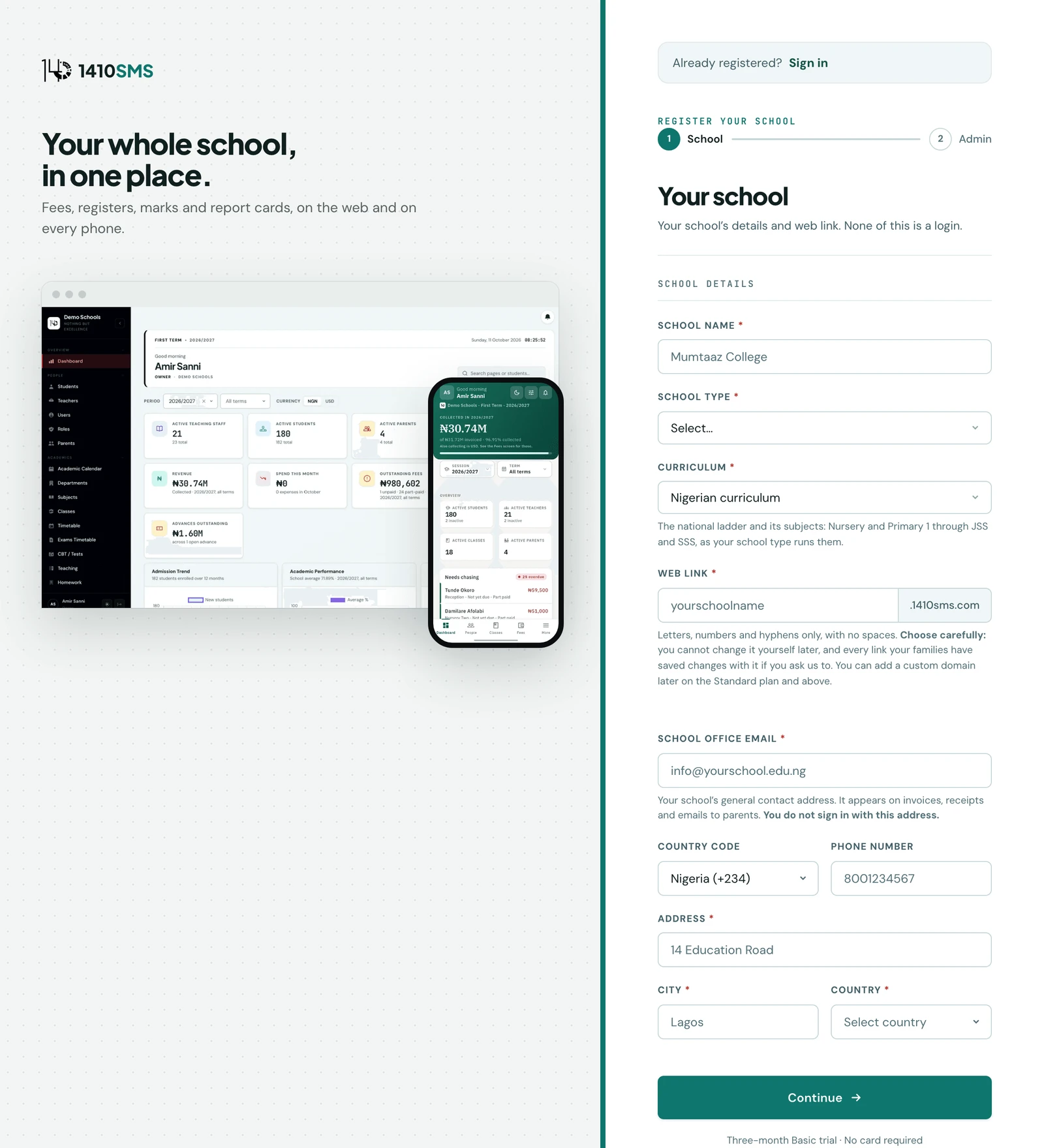
Register your school at the registration page. It takes under two minutes.
Registration steps
- School details. Enter your school name, school type (Nursery, Primary, Secondary, or a
combination), your curriculum, your web link, email, address, city, and country (a phone
number is optional). Your school type and curriculum together drive the auto-setup below, and
your school email becomes the reply-to address on emails sent to parents, which is why it is
required.
The curriculum is what decides the classes, subjects and term names your school starts with. There are six of them: Nigerian, British, Ghanaian, Madrasah, Madrasah (integrated) and Set up manually. The form shows you what each one is about to create before you pick it: how many classes and what the first and last are called, how many subjects in how many departments, and the term names. That preview is served from the same definitions the registration itself reads, so it cannot promise you a ladder you will not get. A British school gets Nursery and Reception through Year 13 on Autumn, Spring and Summer terms; a madrasah gets التمهيدي through الثانوي with Qur'an, Tajweed, Hadith, Fiqh and Arabic. Set up manually creates no classes or subjects at all, for a school that would rather import its own. Whichever you choose, everything it creates can be renamed, added to or deleted once you are signed in.
The web link is offered from your school's name and you can change it here: it becomesyourschool.1410sms.com, the address every parent, pupil and member of staff types. It is checked as you type, so you know it is free before you go on. Because it is a web address it can only carry lowercase English letters, numbers and single hyphens; anything else is removed as you type, and the form says so when it does. Choose it carefully. It is not something you can change yourself afterwards: ask us and we will change it for you, but every link anyone has saved, and every address your families have learnt, changes with it. The mobile app asks for it too and in exactly the same way, so it does not matter which one you register from. - Admin account. Provide the first admin's name, email, phone, and a password of at least 8 characters carrying an upper-case letter, a lower-case letter and a digit, which is the rule every password on the platform is held to. This account will have full access to the platform.
- Email verification. A verification email is sent to the admin email. Click the link, or enter the 6-digit code from the same email, within 24 hours to activate your account. (The mobile app uses the code.)
- School portal ready. After verification, you are redirected to your school's portal at
yourschoolname.1410sms.comwhere you can begin setup.
After registration
Once you are logged in as admin, most of the academic structure above already exists. Review it, adjust anything that does not match your school, then continue with:
- Set up your school branding: logo and motto in School Profile, brand colours in Settings → Brand Colours, so the portal looks like your school from the first day
- Add teachers and assign them to subjects and classes
- Enrol students into classes
- Configure your grading scale in Settings → Academics → Grade Scale
On the phone
You can register your school from the mobile app as well as the web. On the app's first screen, tap Register your school. The app asks for the same things in the opposite order: first Your details (your name, the email you will sign in with and a password), then School details (the school's name, its web address, school type, curriculum, office email and address).
The web address is checked as you type, and the curriculum shows what it will create before you choose it. Tap Create account and the app asks for the code from your verification email. Enter it and tap Verify, and the app takes you to sign in with your school already filled in. Resend code sends a fresh one if it has not arrived.
Ready to try it with your school?
Three-month Basic trial. No card required to register.